
Made with in ClickUp
ClickUp vs. Jira

One app for the sprint and everyone it touches.

The Jira alternative with sprints, docs, chat, and AI in one Workspace for engineering and everyone they ship with.

4.7 on G2Jira 4.3

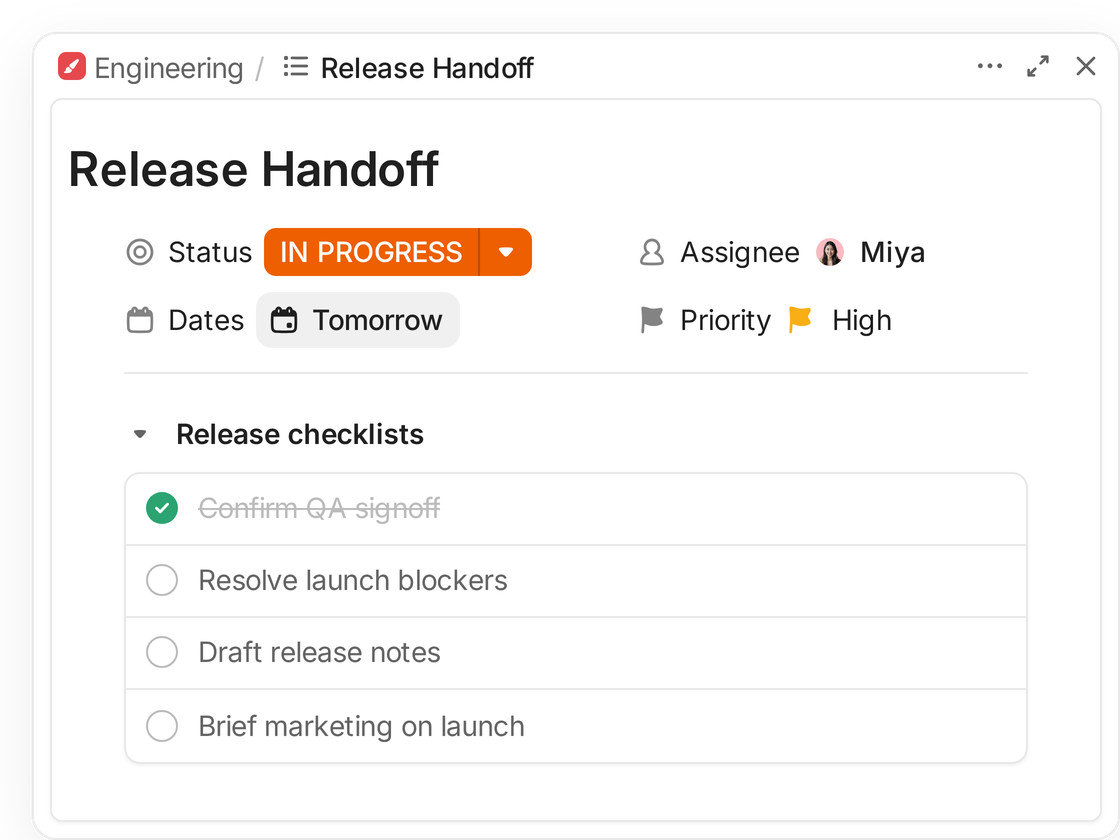
A ClickUp task, Release Handoff, with a checklist that includes briefing marketing on the launch
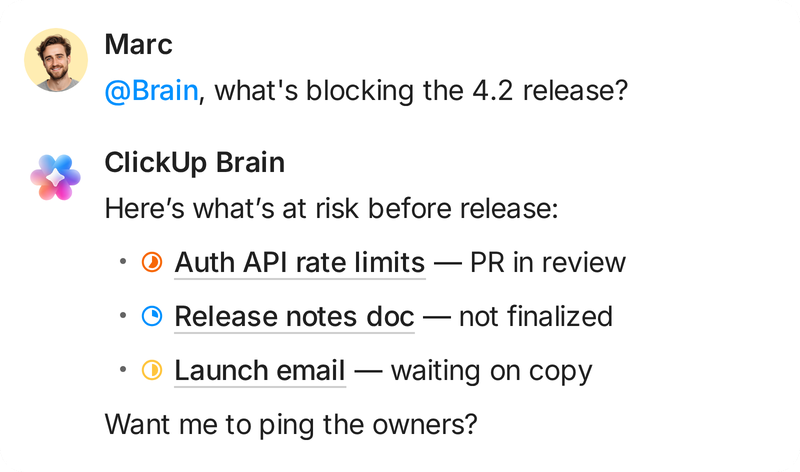
Asked what's blocking the 4.2 release, ClickUp Brain lists a PR in review, an unfinished release notes doc, and a launch email waiting on copy
Super Agent: I posted the release summary and updated marketing's launch calendar
The verdict

ClickUp is the better fit once work leaves engineering

It usually starts when marketing, operations, or product needs to plan beside engineering, and the Jira setup that fits the developers stops fitting anyone else.

“I joined Gatekeeper as a Jira champion with grand plans to implement it. Two years later, our entire product and engineering org lives in ClickUp, and we've never looked back.”

Sam PavittHead of Product, Gatekeeper
See the difference

ClickUp vs. Jira compared

What each tool covers on its own, what it costs per user, and where Jira is the stronger pick.
Last updated September 2026

ClickUp

Jira

At a glance
What you are buyingWhat it takes to cover tasks, docs, video, and chat.
One platform
Jira plus add-onsConfluence, Loom, and chat bought separately
Free planWho can work, and how much they can store, before anyone pays.
Unlimited members60MB storage
10 users2GB storage
Built forThe team each product was designed around.
Every teamEngineering, marketing, operations
EngineeringIssues, sprints, releases
G2 ratingOverall star rating on G2, September 2026.
4.7 / 5
4.3 / 5
Features
Collaborative DocsWrite specs and wikis beside the work they describe. See ClickUp Docs
All plans
ConfluenceSeparate product
Real-time ChatTalk about work in the place the work lives. See ClickUp Chat
All plansFull history on Business
Slack or TeamsComments on work items
Native time trackingLog time on tasks without adding an app. See ClickUp time tracking
From Unlimited
Basic loggingReports need Tempo or similar
Screen recordingRecord a walkthrough and attach it to its task. See ClickUp Clips
Trial on FreeUnlimited on Business
LoomSeparate product
WhiteboardsSketch plans beside the tasks they become. See ClickUp Whiteboards
From Free Forever
Separate appMiro or similar
Sprints and story pointsRun Scrum with points, velocity, and burndown. See ClickUp Sprints
Sprint Points on Business
Native on every plan
Automation runs, entry planMonthly automation runs on each tool's cheapest paid plan.
1,000 a monthUnlimited plan
1,700 a monthStandard plan
Pricing
Free plan
FreeFree Forever. Unlimited members.
FreeUp to 10 users.
Entry paid plan
$7/user/moUnlimited, billed yearly
$7.91/user/moStandard, list rate, billed yearly
Mid tier
$12/user/moBusiness, billed yearly
$14.54/user/moPremium, list rate, billed yearly
Enterprise
CustomContact sales
CustomAnnual terms only
AI
$9/user/moBrain AI add-on, billed yearly
Included, pooledRovo credits shared per org. Rovo Dev $20 per developer.

Try it on Free Forever first, with your whole team and no card.

ClickUp prices billed yearly, from clickup.com/pricing. Jira list rates from Atlassian, which vary by seat count and billing cycle. September 2026.

What actually sets them apart

What changes when the whole team works in one place

Jira handles the sprint well. These are the places a mixed team feels the gap in an ordinary week.

The Jira bill rarely stops at Jira

A Jira team that wants shared docs, screen recordings, and chat usually adds Confluence, Loom, and Slack or Teams, each billed on its own. Jira Premium lists at $14.54 per user per month before any of that. ClickUp Business is $12 per user per month billed yearly, with Docs, Chat, Whiteboards, Clips, and time tracking already in it.
JiraPer user, per month
Bought beside itConfluenceLoomSlack or TeamsTime reporting app
ClickUpBilled yearly
DocsChatWhiteboardsClipsTime tracking

Marketing and ops get views, not a new vocabulary

Jira models work as issues, epics, and sprints, which suits developers and slows down the marketing lead planning a launch. In ClickUp, the same tasks engineering uses open as a Calendar, Gantt, Table, Workload, or Form view. Each team plans in a view that fits its work, instead of translating tickets for the weekly update.
JiraBuilt for developers
ClickUpSame tasks, seven views

Engineering keeps its board. Marketing opens the same work as a calendar.

Jira rewards an admin. ClickUp does not need one.

Jira's workflow schemes, validators, and post-functions give a large engineering org control ClickUp does not match. That pays off when you have a dedicated administrator. Without one, every workflow change waits in a queue. In ClickUp, the team lead edits statuses, Custom Task Types, and Automations directly, and G2 reviewers rate its ease of admin 8.6 against Jira's 7.5.
JiraChange made by
Adminedits the scheme, then the team gets the new step
What the admin maintainsWorkflow schemesValidatorsPost-functions
ClickUpChange made by
Leadthe team lead edits it directly, the same afternoon
Custom statusesCustom Task TypesAutomations

G2 ease of admin: ClickUp 8.6, Jira 7.5.

AI that reads the whole Workspace

Rovo comes with paid Jira plans and reads Jira issues and Confluence pages. Conversations in Slack and other tools reach it only through connectors an admin sets up. ClickUp Brain works across tasks, Docs, Chat, Whiteboards, and Clips because they live in one Workspace, so a question about a project can draw on the spec, the thread, and the walkthrough together.
Atlassian RovoIncluded on paid Jira
Jira issuesConfluence pages
Other tools, through connectors an admin sets upSlack or TeamsOther apps
ClickUp BrainOne Workspace
TasksRead natively
DocsRead natively
ChatRead natively
WhiteboardsRead natively
ClipsRead natively
Customer results

What teams report after moving work into ClickUp

37%Productivity increase at Yggdrasil Gaming after its engineering team replaced Jira with ClickUp.
3 to 1Kiefer replaced Jira, Microsoft Teams, and Outlook with one ClickUp Workspace.
6 to 1Wallester consolidated six tools into one ClickUp Workspace after Jira proved too technical for its non-developers.

G2 reviewers score ClickUp over Jira

Category scores from G2 on a 10-point scale, retrieved September 2026. ClickUp leads all five shown. Ease of admin has the widest gap, which is the cost a Jira team usually carries through its administrator.
  • Ease of admin8.67.5
  • Product direction9.48.2
  • Quality of support8.98.2
  • Good partner9.08.5
  • Ease of use8.58.0

Scored out of 10. Source: G2 ClickUp vs. Jira comparison.

Which is right for you

ClickUp vs. Jira: Which should you choose?

Jira is the right call for a pure engineering org with an admin. For a team that works across functions, ClickUp is the stronger pick.

Why teams pick ClickUp

  • You need marketing, operations, and engineering planning in one tool without separate training.
  • You want Docs, Chat, Whiteboards, and time tracking without adding Confluence and Loom.
  • You want the person who needs a workflow changed to be the one who can change it.

When Jira is enough

  • You run formal Scrum at scale and have a dedicated Jira administrator to maintain it.
  • You need workflow validators that block a deployment until compliance checks pass.
  • Your delivery depends on Atlassian Marketplace apps such as Zephyr or Xray.
Verdict by team typeBetter fit
  • Agency billing hours against client deliverablesClickUp
  • Marketing or ops team stuck in an engineering toolClickUp
  • Product org where specs matter as much as ticketsClickUp
  • Large engineering org with formal Scrum and an adminJira
  • IT service desk that needs SLAs and a customer portalJira
Make the switch

Bring your Jira projects across

50GBis the largest Jira backup the importer accepts. Larger instances go through ClickUp Professional Services.
The importer takes a backup from Jira Cloud or an on-premise Jira Software instance, and asks you to map structure, people, and fields before anything moves.
  1. 1Export from JiraDownload a Jira backup file, then upload it in ClickUp under Settings, Imports / Exports.
  2. 2Choose your hierarchyPut epics in one List with stories as subtasks, or keep both as tasks linked by Relationships.
  3. 3Map people and fieldsMatch Jira users, statuses, and built-in custom fields to ClickUp. Priority, timestamps, and user-defined fields stay behind.
Your questions, answered

Frequently asked questions

Switching and your data

Issues, subtasks, assignees, followers, dependencies, comments with their authors, attachments up to 1GB each, statuses, and Jira's built-in custom fields. Recurring tasks, timestamps, the priority field, and user-defined custom fields do not transfer. Private Jira comments arrive as public ClickUp comments, so review sensitive projects first.

You pick a hierarchy before the import runs. One option puts every epic in an Epics List as a task, with its stories as subtasks. The other creates separate Lists for epics and stories, linked by Relationships. Pick the first if epics and stories should share statuses.

Yes. You can import one project or a few at a time, so engineering stays in Jira while other teams move first. Uploaded Jira files stay available to reimport for 30 days. For projects that must live in both, Jira Sync (beta, Business Plus or Enterprise with Jira Premium) updates both ways.

Yes. Confluence is a separate Atlassian product with its own export, so ClickUp runs a separate Confluence import that lands your spaces and pages in ClickUp Docs. Once both imports finish, tasks and the docs about them sit in one Workspace and can link to each other directly.

Pricing and seats

ClickUp Free Forever has no member limit and includes unlimited tasks and Docs, with 60MB of file storage. Jira's Free plan stops at 10 users and includes 2GB of storage. Team size is usually what forces a Jira purchase. Storage is usually what forces a ClickUp one.

ClickUp includes trial AI on every plan. Brain AI is $9 per user per month billed yearly and adds unlimited Brain Assistant use. Jira includes Rovo on paid plans with credits pooled across the organization, and sells Rovo Dev separately at $20 per developer per month.

Workflows and security

Yes. The Sprints ClickApp adds Sprint Folders, sprint automation, and Sprint Points, and Sprint reporting covers velocity and burndown. Sprint Points and Sprint reporting sit on the Business plan, so a team running formal Scrum should budget for Business rather than Unlimited.

ClickUp includes 100 automation runs a month on Free Forever, 1,000 on Unlimited, 5,000 on Business, and 250,000 on Enterprise. Jira includes 100 rule runs on Free, 1,700 on Standard, and 1,000 per paid user on Premium, pooled across the site. A large team on Jira Premium gets more runs than ClickUp Business.

Yes. Any ClickUp member with permission can add List, Board, Calendar, Gantt, Table, Workload, Mind Map, or Form views to work they can already see. There is no scheme to publish and no field configuration to approve first, which is the step Jira routes through an admin.

ClickUp holds SOC 2, ISO 27001, ISO 27017, ISO 27018, and ISO 42001, and is GDPR and HIPAA compliant. Data residency (US, EU, Singapore, or Australia), SAML single sign-on, SCIM, and audit logs are on ClickUp Enterprise, and HIPAA coverage runs through sales. Jira puts data residency, audit logs, and Atlassian Guard on its Enterprise plan too, and holds FedRAMP Moderate, which ClickUp does not. If you need FedRAMP, plan for that difference.

Start free and import one Jira project to test.