Product
Super Agents can now install and run Skills
ClickUp shipped Skills for Super Agents to production on September 4. Installing one counts as an assignment, so the permission model got rebuilt underneath to keep anyone but an agent's managers from changing what it knows.
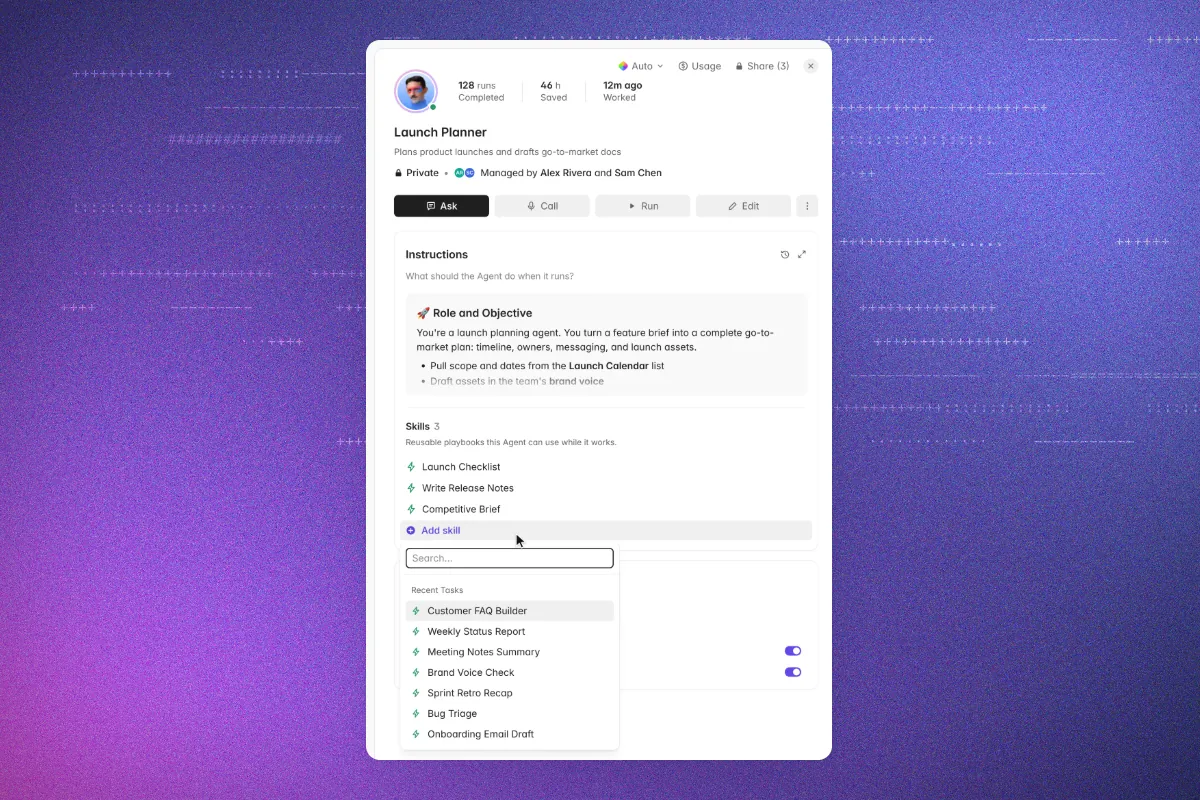
ClickUp shipped Skills for Super Agents to production in early September, closing a gap that had been open since Skills first arrived in ClickUp earlier this summer. Agents could already read a Skill, because every Skill is a task underneath, but nothing let anyone install one from the agent itself.
Installation now works from either end. On a Super Agent's profile there is a Skills section that lists what is installed and takes additions one at a time, sitting alongside the rest of the agent's configuration. From the Skills Hub, the Enabled For column accepts an agent the same way it already accepted a person or a Team.
The detail that makes this more than a shortcut is where an installed Skill lives. It sits on the agent's config rather than inside its instruction field, which is why the profile reflects a change in real time and why each Skill appears in the Trace after a run. What an agent actually reached for is now legible, not inferred.
Installing a Skill is an assignment, so permissions had to change
Adding a Skill to an agent assigns that Skill to it. That single fact pulled in the permission system: assignee permissions were made granular by task type so agent Skills could be governed separately from ordinary task assignment.
The result is that only people with Can manage on an agent can install or remove its Skills. Trigger-only and view-and-trigger access cannot, and the rule holds on web, on mobile, through API v1 and v3, through bulk edit, and if someone asks Brain to do it. Closing the surfaces one at a time is the tedious version of this work, and it is the version that means a shared agent cannot be quietly rewired by whoever happens to have a link to it.
Private Skills work on shared agents without leaking
A Skill that stays private can still be installed on an agent other people use. Teammates without access to it see a collapsed row with a count and nothing else. The agent uses the Skill at runtime regardless.
That closes the practical hole in Skills as a Brain-only feature. The most specific Skills people write tend to be the ones they never share, and until now those were the ones an agent could not use.
What it changes
The shift is toward composition. A specialized agent stops being one instruction field stretched to cover every job and becomes a stack of Skills, each editable on its own and reusable across agents. Update a Skill once and every agent running it inherits the change.
Skills for Super Agents is live in production now. Availability and limits vary by plan and role, and the Skills Hub requires the AI and Custom Skills ClickApps to be enabled in a Workspace.