Playbook

Build vs. Buy: The CIO's Playbook for Super Agents

Learn how to design and roll out a Super Agent platform using ClickUp, so you can move beyond experiments, unify work around a converged AI workspace, and make a confident build‑vs‑buy decision.

Introduction

In the Build vs. Buy: Why ClickUp’s Super Agent Platform Is Different webinar, we walk through why 95% of AI pilots fail, what’s really required to make agents trustworthy at enterprise scale, and how to evaluate whether to build your own stack or buy a converged Super Agent platform.

This playbook turns that conversation into an end‑to‑end guide you can use to design, prove, and scale a CIO‑level agent strategy on ClickUp.

buy vs build webinar

Watch the Webinar

Want to see these strategies and best practices in action?

Watch the full on-demand webinar to see how top enterprise IT and operations leaders are reimagining productivity with AI Super Agents, including:

  • How ClickUp Super Agents deliver human-level memory, learning, and context
  • Why unified permissions and implicit sharing change the game for collaboration
  • How to eliminate fragmented knowledge and manual agent management
  • Real-world strategies for secure, scalable, and transparent AI adoption

Why CIO AI Programs Fail

95% of AI pilots fail.

Most CIO AI programs fail not because of weak models, but because the transition from pilot to production exposes deeper issues in context, workflow, and change management.

Here are the root causes of AI program failure:

No unified context.

  • The models are smart, but what's missing is the connective tissue to your work. Agents can't see the full picture across tasks, docs, apps, and conversations, so they behave like isolated chatbots.

Work and Context Sprawl.

  • Teams already suffer from app sprawl. AI introduces a second problem: context sprawl. Your knowledge, history, and decisions are scattered across tools that agents can't easily index or act on.

Underestimated effort.

  • Many organizations dramatically underestimate how much work it takes to build a high-quality agent that can handle business-critical workflows. It's not just prompt engineering it's mapping processes, curating knowledge, and encoding guardrails.

Change management debt.

  • Even when the tech works, people don't automatically change. You can't just tell five thousand employees to "use AI" and expect results. If the experience isn't inside their existing workflows and if it doesn't push value to them it gets ignored.

Hidden barriers to AI Agents.
Traditional AI projects treat “agent” as another tool. The org buys a vertical AI product, points it vaguely at their stack, and expects magic.

What they get is:

  • Agents that can’t see enough of the work graph to be trustworthy.
  • Shadow workflows living outside core systems.
  • Manual supervision to fix hallucinations and missing data.
old way of working is broken

The Future of Work: Convergence + Super Agents

"The limiting factor is no longer model intelligence. It's whether your agents can see the right context, act in the right places, and behave like teammates."

— Jay Hack, Head of Artificial Intelligence at ClickUp

The future of program execution is converged and AI-powered. Instead of fragmented workflows, leading organizations are bringing everything together in a single, unified workspace—where every project, doc, conversation, and decision lives side by side.

This is where Convergence meets AI.

  • One workspace where projects, requests, docs, conversations, and dashboards live side by side.
  • Agents that show up as real users on your work graph—assigned to tasks, mentioned in comments, and bound by the same permissions as humans.
  • Architecture that makes it easy to move from individual productivity agents to organization‑wide, mission‑critical workflows.

When you converge your people, processes, and technology—and power it all with AI—you unlock a new level of speed, clarity, and innovation.

To succeed, organizations must recognize that model intelligence is no longer the bottleneck. Effective agents depend on their ability to access the right context, take action in the right places, and behave like teammates rather than isolated bots.

  1. See the right context (tasks, docs, meetings, external tools).
  2. Act in the right places (update work, create docs, post in chat).
  3. Behave like teammates, not isolated bots.

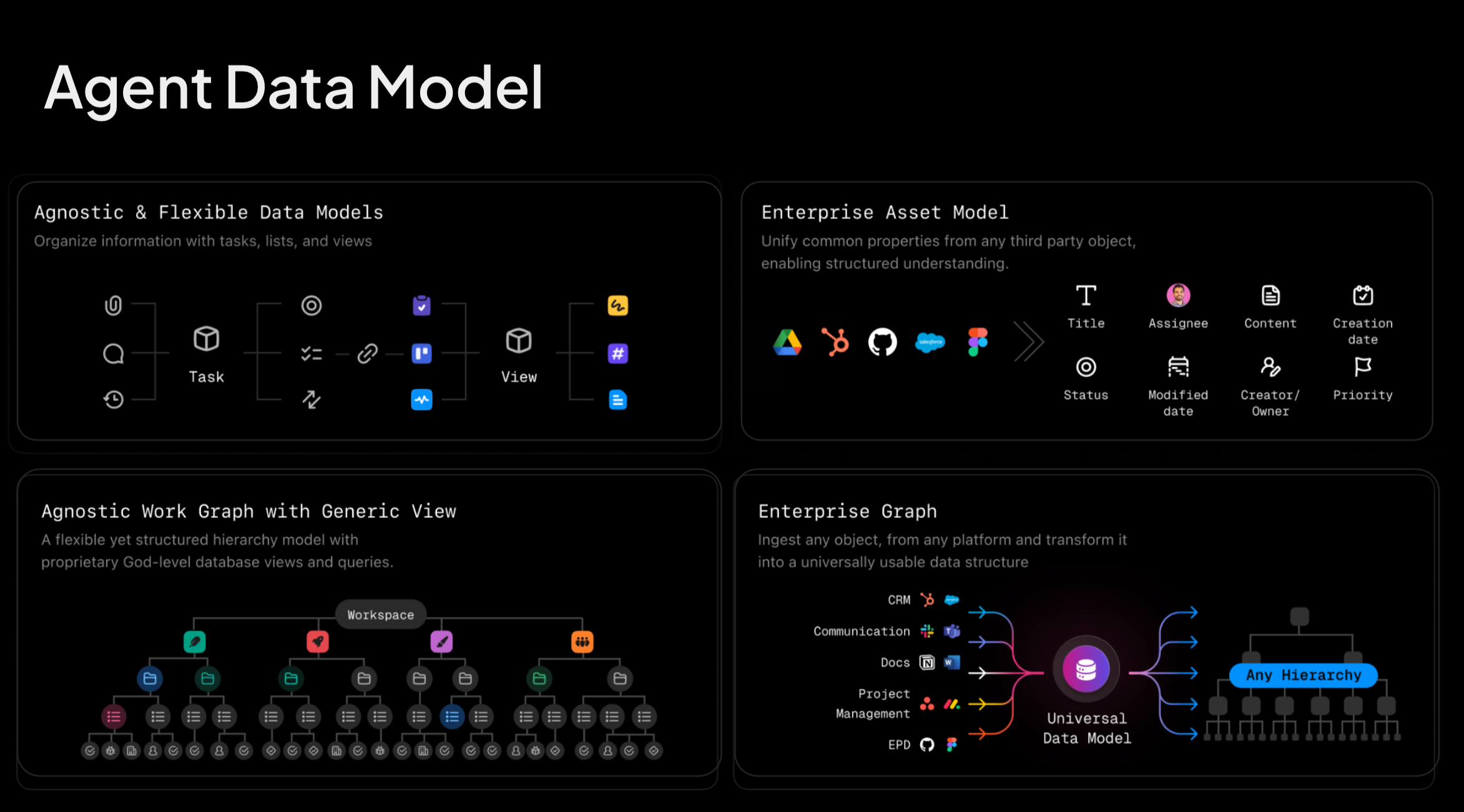
Agent Data Model

ClickUp’s Super Agents are designed around those three requirements. They:

  • Use ClickUp’s unified data model to navigate your work graph.
  • Call tools that read and write to tasks, docs, dashboards, and integrated apps.
  • Respect the same permission model as your users so you can reason about what they can see and do.
  • Accumulate transparent memory (stored in docs you can inspect and edit) so they actually improve over time.

With that foundation in place, you can move beyond LLM experiments and start designing a Super Agent Platform—a set of agents that sit on top of your converged workspace and shoulder real work.

the future of work is convergence and ai

The Super Agent Platform Blueprint

Two complementary goals define a CIO-level AI strategy:

Democratize AI Make it easy for individuals to spin up lightweight agents that remove daily friction.

Standardize mission-critical workflows Codify complex, cross-functional processes into trustworthy agents built and tested with your experts.

This blueprint gives you 5 plays to do both, using the transcript as your guide and ClickUp as the operating system.


1. Map Your Work Graph and Flagship Workflows

Goal: Align your Super Agent strategy with where work and risk actually live.

Getting agents ready for prime time requires work that starts before you ever open an agent builder.

Inventory your critical workflows.
Focus on areas where executives already feel the pain:

  • Program and portfolio execution
  • Incident and change management
  • Strategic initiatives and transformations
  • Executive reporting and risk dashboards

Map those workflows into ClickUp.
Ensure each step in the flow has a home:

  • Spaces, folders, and lists that mirror real teams and programs
  • Tasks representing requests, projects, and run‑state work
  • Custom fields for priority, owner, line of business, risk level, and health

Surface where context is missing today.
Look for signals the webinar audience echoed:

  • Approvals that stall because stakeholders lack visibility
  • Status reports assembled manually from scattered tools
  • Rework caused by unclear requirements or disconnected systems

Choose 2–3 flagship workflows as your initial Super Agent lane.
You’re aiming for high impact with tight scope—enough to prove value, not boil the ocean.

Why this matters
Treating a vertical AI product like a generic chatbot—without access to your organization's history and context will not yield meaningful results. This play is about mapping your work graph and workflows so agents have the ingredients and context they need to be genuinely helpful, rather than operating blindly.

Agent User Model and Work Graph

2. Design Your Super Agent Catalog

Create a clear, CIO-level view of which agents you'll deploy and why.

There is a crucial distinction between personal productivity agents (like a daily briefing agent that reads your calendar) and certified, company-wide agents (like a Program Manager Agent that prepares CIO-ready updates). Your catalog should include both.

Start with three tiers:

  • Strategic agents – Support executive decisions.
  • Examples: CIO Briefing Agent, Portfolio Exec Agent, AI Strategy Advisor.
  • Operational agents – Run day‑to‑day workflows.
  • Examples: Program Manager Agent, Sprint Readiness Agent, Incident Triage Agent.
  • Specialist agents – Focus on specific domains or systems.
  • Examples: Security Risk Agent, Capacity Planning Agent, Knowledge Curation Agent.

For each proposed agent, document:

  • Purpose: What job is this agent hired to do? How will you know it’s successful?
  • Owner: Who is accountable for its behavior and roadmap?
  • Scope: Which spaces, folders, lists, and external tools can it see?
  • Inputs: What triggers it (new request, status change, time‑based cadence, @mentions)?
  • Outputs: Tasks updated, comments posted, dashboards refreshed, docs created, or hand‑offs initiated.
Agents for every use case

3. Architect the Agent User Model & Permissions

Ensure agents see enough to be helpful—but not more than they should.

One of the most subtle and critical parts of the architecture: agents behave like users in your workspace.

That design choice gives you a simple mental model:

  • If a human user shouldn’t see or do something, their agent counterpart shouldn’t either.
  • If you already trust your permission model, you don’t need a second, parallel security system for AI.

To put this into practice:

Start with your existing permission model.
Identify spaces/functions that require strict separation (Finance, HR, Legal, sensitive customer data). Highlight where cross‑functional visibility is essential (executive dashboards, major initiatives).

Create Super Agent user accounts aligned to major domains.
Examples: CIO Exec Agent, PMO Program Agent, IT Ops Incident Agent. Assign spaces and folders based on least‑privilege principles.

Grant only the access each agent needs to do its job.
Prefer ClickUp’s existing sharing model over custom, ad‑hoc ACLs.

Decide what agents can do autonomously vs. with approval.
Autonomous: update statuses, add comments, generate summaries, draft emails. Approval‑gated: move work across phases, change critical fields, close incidents, modify budgets.

Document the matrix.
Create a single view that answers “What can this agent see and change?” for security, legal, and audit teams.

Agent Tools and Memory

4. Stand Up a Flagship CIO Use Case

Prove value with one end‑to‑end workflow before you scale.

AI success is not about "ten thousand experiments" but about one or two flagship workflows that prove real business value and build trust.

A strong first target is program and portfolio execution, where executives feel both risk and opportunity.

Example: Program Manager Super Agent

A typical pattern for a Program Manager Super Agent looks like this:

  • The agent watches initiatives across a strategic Programs list.
  • It summarizes risk, scope, and timing for weekly CIO reviews.
  • It flags slippage, dependency conflicts, or under‑resourced workstreams.
  • It drafts stakeholder updates based on the latest activity in ClickUp.

Implementation steps:

Configure a shared Programs view.
Filter by active initiatives, owners, health, and priority. Standardize custom fields used to describe status, risk, and milestones.

Define agent triggers.
Weekly cadence for executive summaries. Event‑based triggers when health drops, deadlines slip, or risk fields change.

Design the outputs.
CIO‑ready summary doc or comment that answers “What changed, where are we off track, what decisions are needed?” Inline updates to fields and dashboards so humans see the same truth.

Pilot with one portfolio.
Treat it like a product beta: collect feedback, adjust prompts, refine permissions. Add transcript‑inspired guidance (“Don’t just ask AI to do all the lifting—invest up front in the right instructions.”)

Document the pattern.
Once the use case works, capture it as a reusable blueprint for other programs.

Why this matters
This play is where the build-vs-buy decision becomes real: you're using the ClickUp agent framework to codify your flagship workflow.

Project Manager Agent

5. Operationalize Security, Compliance, and Governance

Build a governance layer that satisfies risk teams without throttling innovation.

"ClickUp's Super Agent framework is built around constrained, observable behavior—not unconstrained agent swarms."

—Jay Hack, Head of Artificial Intelligence at ClickUp

Questions about multi-agent unpredictability, testing, and security are central to any CIO or analyst's due diligence.

Your governance layer should mirror that philosophy.

Stand up an AI review board.
Include IT, Security, Legal, Data, and key business owners. Give them clear authority over which agents go to production and where they can operate.

Require a lightweight design doc for every new agent.
Owner, scope, knowledge sources, tools, permissions, and failure modes. Link directly to the agent’s profile and memory docs in ClickUp.

Codify guardrails in ClickUp.
Tag sensitive work with custom fields (e.g., Data Sensitivity, Regulatory Impact). Restrict agents from interacting with high‑sensitivity items until controls are proven.

Enable robust logging and observability.
Use ClickUp’s activity, audit trails, and agent memory docs to review behavior. Create dashboards that track agent‑initiated changes over time.

Run regular “red team” reviews.
Test for prompt injection, data leakage paths, and mis‑scoped permissions. Use the findings to adjust scopes, prompts, and approval flows.

Why this matters
Constraining conversations and making actions auditable extends ClickUp's "agent harness" to your own operating model.

Agent security and permissions

Bringing Your AI Strategy to Life

When you present your Super Agent strategy to the board, you need more than anecdotes. The webinar underscored that the best stories paired outcome metrics with governance metrics.

Track a mix of productivity, risk, and adoption signals.

Productivity & Throughput

  • Time saved preparing executive updates, status reports, and post‑mortems.
  • Reduction in cycle time for approvals, escalations, and incident resolution.
  • Number of workflows where agents are active, trusted participants.

Risk & Governance

  • Incidents or near‑misses attributable to agent behavior.
  • Percentage of production agents covered by logging, monitoring, and audit trails.
  • Share of agents reviewed and approved by the AI governance board.

Adoption & Engagement

  • Number of teams actively working with agents (assigning, mentioning, messaging).
  • Satisfaction scores from business stakeholders using agent‑powered workflows.
  • Re‑use of agent patterns and templates across departments.

Use these metrics to decide where to double down on your converged Super Agent platform and where bespoke builds might still make sense.

To keep momentum:

Pick your flagship workflow.
Choose a use case where your executives already feel the pain—program execution, incident management, or strategic initiatives.

Stand up a pilot in ClickUp.
Use this playbook plus the transcript to encode your process, agent catalog, and governance model.

Measure and iterate.
Track the metrics above and use them to guide your next wave of agents.

org wide productivity