
Always-on campaigns. Looming deadlines. Stretched budgets. Marketing teams are constantly under pressure.
On top of that, you need to manage creative briefs and content calendars, track campaign metrics, and align cross-functional teams.
Marketing project management software brings sanity to this chaos. These platforms consolidate your marketing activities into a single source of truth, giving everyone visibility into progress and blockers. They also help in managing marketing tasks to streamline and speed up execution with automated approval workflows that reduce the back-and-forth.
In this guide, we’ve put together a list of the top marketing project management software platforms that help marketing teams plan and scale business operations and stay sane.
How we review software at ClickUp
Our editorial team follows a transparent, research-backed, and vendor-neutral process, so you can trust that our recommendations are based on real product value.
Here’s a detailed rundown of how we review software at ClickUp.
Marketing Project Management Tools Comparison at a Glance
Here’s an overview of the top marketing project management software, along with their key features and pricing structure.
| Tool name | Key features | Best for | Pricing* |
| ClickUp | Custom dashboards, whiteboards, team collaboration, integrated AI, multiple Views, proofing tools | Marketing teams and agencies needing an all-in-one AI-powered workspace | Free plan available; Custom pricing for enterprises |
| Wrike | Wrike AI, customizable request forms, proofing, Gantt charts | Marketing teams managing high volumes of requests, resources, and creative approvals with advanced reporting needs | Free plan available; Paid plans start from $10/user/month |
| Asana | AI Studio, team priorities, task comments, tasks, Work Graph® | Marketing teams running multi-channel campaigns who need visibility into how every task ladders up to objectives | Free plan available; Paid plans start from $13. 49/user/month |
| Zoho Projects | Templates, Blueprint editor, critical path view, AI assistance, Zoho ecosystem integration | Marketing teams that want affordable project tracking, automation, and collaboration in one platform | Free plan available; Paid plans start from $4/user/month |
| ProofHub | Task lists, custom roles, annotation tool, Gantt chart, ProofHub forms | In-house marketing teams needing a centralized space for collaboration, discussions, and creative proofing | No free plan; Paid plans start from $50/month per user |
| Teamwork | Intake forms, timesheets, client portal, AI assistance, Portfolio boards | Marketing agencies managing client work, retainers, and invoices alongside campaign planning | Free plan available; Paid plans start from $10. 99/month per user |
| Nifty | Orbit AI, Roadmap view, Swimlane view, Milestones, Docs | Marketing teams wanting workflow automation, milestone tracking, and predictive insights with AI | Free plan available; Paid plans start from $49/month per user |
| Hive | Hive Automate, AI assistance, time tracking, email and messaging, Zoom integration | Marketing teams needing built-in proofing, approvals, and AI-powered assistance | Free plan available; Paid plans start from $5/month per user |
| Basecamp | Focus mode, Doors, Hey menu, shared calendars, Hill Charts, Pings | Small marketing teams and startups that want simple project tracking and communication | Free plan available; Paid plans start from $15/month per user |
| Workfront | AI, capacity planning, custom views, approval flows, integration with Adobe tools | Enterprise marketing operations teams managing large-scale digital marketing campaigns with integrated Adobe workflows | Custom pricing |
| Trello | Visual boards, timeline view, Trello Planner, Trello Inbox, custom card, board buttons | Marketing teams that prefer a simple, visual tool for campaign calendars, events, and creative workflows | Free plan available; Paid plans start from $6/month per user |
⚡ Template Archive: Free Marketing Campaign Templates to Simplify Planning and Execution
Features to Look for In Marketing Project Management Software
Not all project management platforms are built with marketers in mind. To avoid picking a tool that adds more work than it saves, here are the features you’ll want to prioritize:
- Campaign and task management: Since your marketing team manages several deliverables at any given time, look for a platform that offers flexible task management through lists, Kanban boards, calendars, and Gantt charts
- Content and asset collaboration: Features like file sharing, version control, and proofing are non-negotiable for marketing project managers since campaigns often involve multiple departments and even external partners
- Cross-functional visibility: Dashboards, workload management, and time tracking in a project management software allow leaders to spot bottlenecks early and keep everyone aligned with deadlines in complex projects
- Approval workflows: Campaigns often stall waiting for stakeholder sign-offs. Look for marketing project management solutions that let you automate approval workflows
- Performance tracking: Look for tools with dashboards, analytics, and goal-tracking features that connect project progress to marketing KPIs
- Integration with marketing tech stack: Whether you’re syncing campaign data from HubSpot, files from Google Drive, or updates into Slack, integrations enable data flow
- Scalability and customization: Look for custom fields, templates, and enterprise-grade controls so you can adapt the platform as your campaigns and teams evolve
- AI-powered assistance: Choose a marketing project management software that offers AI-powered task automation, content generation, and workload forecasting to cut down on repetitive tasks
The Best Software for Managing Marketing Projects
Below, we’ve compiled a list of the best marketing project management software tools you can use.
1. ClickUp (Best for marketing teams and agencies needing an all-in-one workspace)
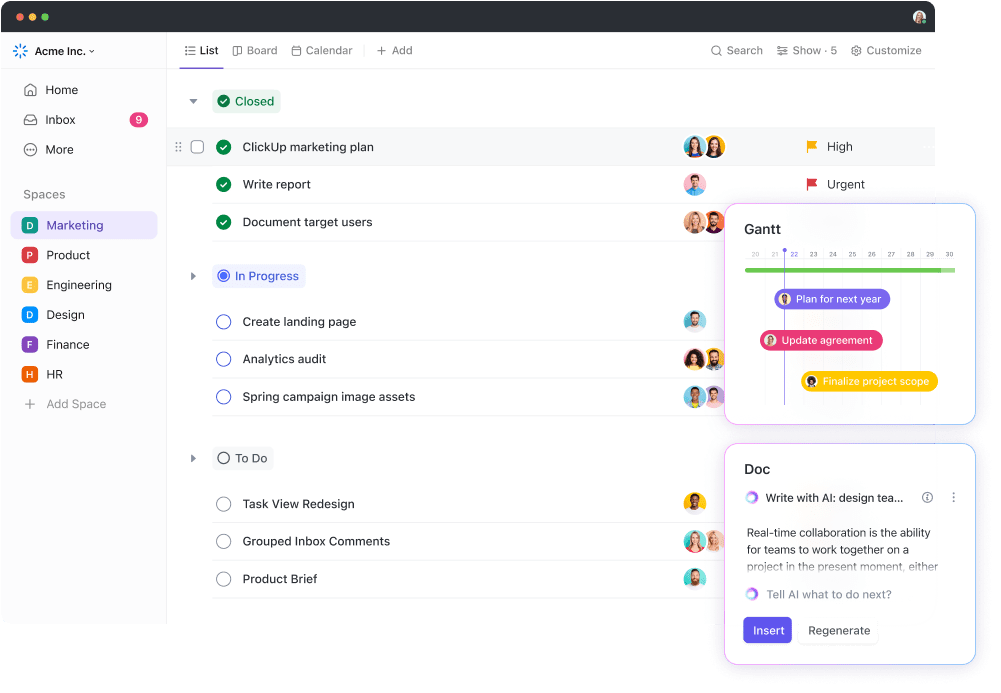
ClickUp, the everything app for work, centralizes your marketing campaigns, creative workflows, and cross-team collaboration.
With ClickUp’s Project Management Solution, you get three core building blocks for seamless collaboration on your marketing plan.
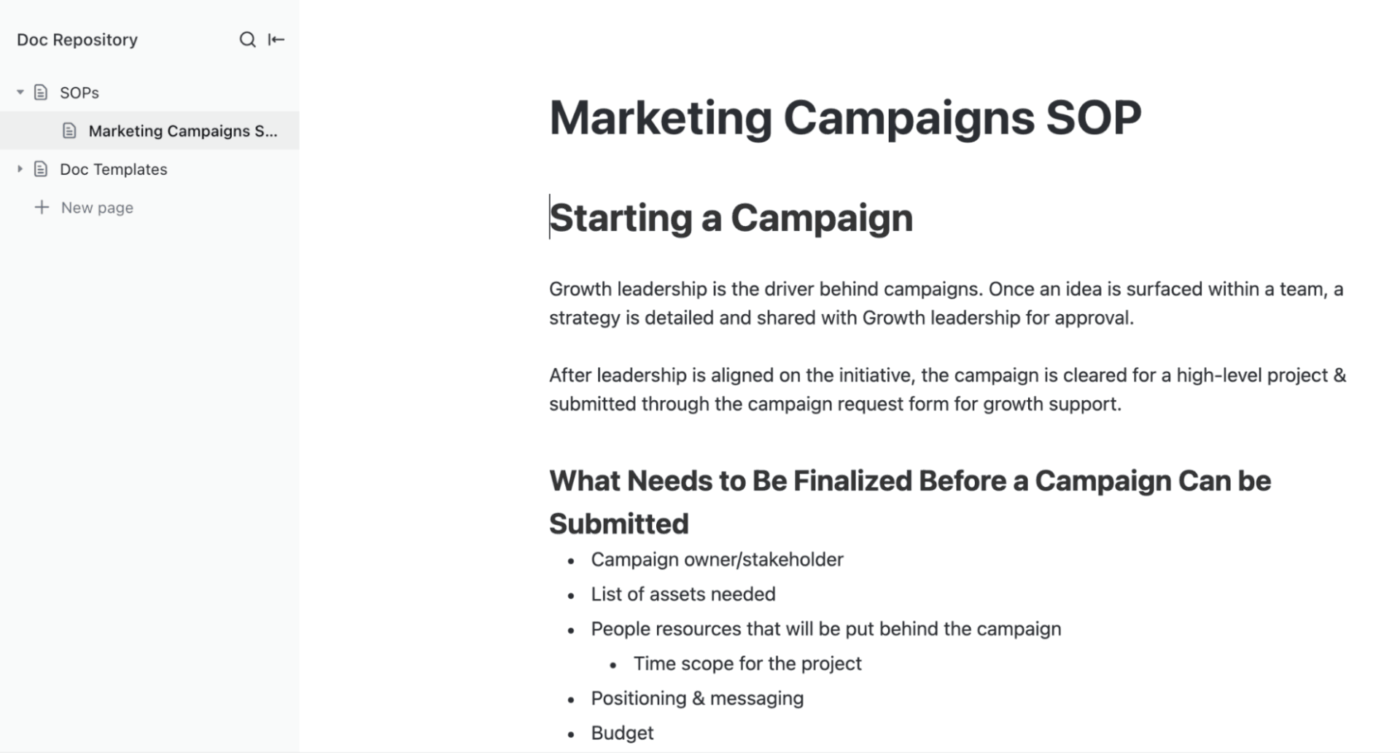
The first, ClickUp Docs, is a collaborative documentation tool that centralizes your campaign briefs, messaging guidelines, ad copy drafts, and even centralized learning notes.
With real-time editing and inline comments, multiple teammates can draft, review, and refine content simultaneously. It is perfect for coordinating between copywriters, designers, and campaign managers.
You can also @mention teammates, link tasks, or embed dashboards directly inside a doc, so context never gets lost.
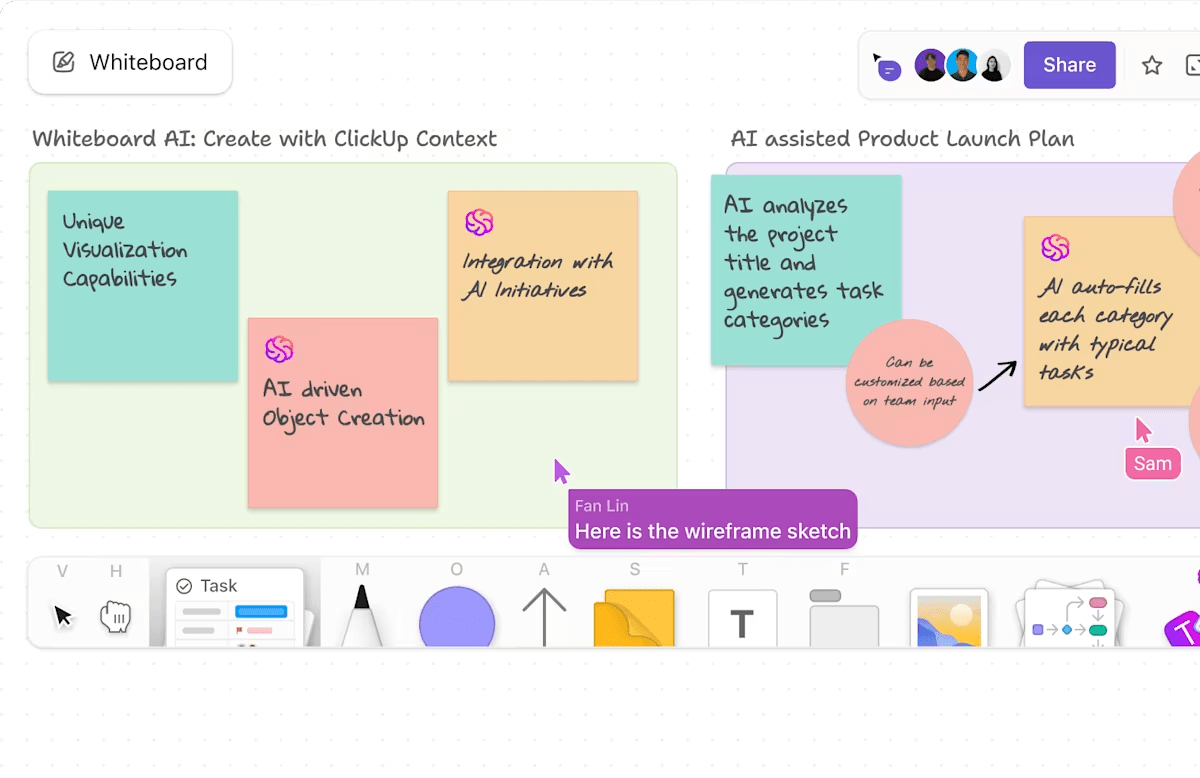
ClickUp Whiteboards turns your marketing brainstorms and brand storytelling into a blueprint for execution. As your AI-enabled virtual canvas, whiteboards allow you to sketch out your campaign concept, insert sticky notes, shapes, or images, and visualize funnels or launch flows.
Whiteboards work great for visual collaboration for remote or hybrid teams: multiple stakeholders can ideate in real time, with live cursors and seamless updates.
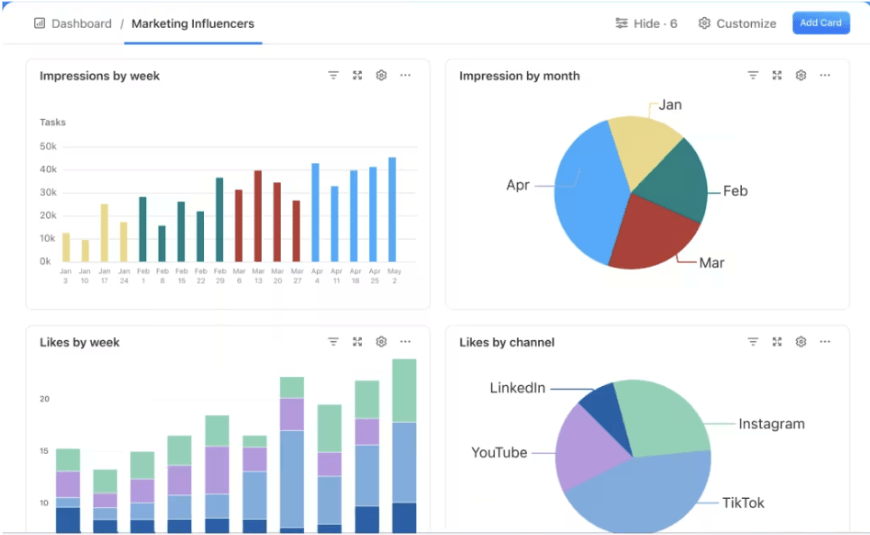
Then, using ClickUp Dashboards, marketing managers can track all their campaigns and activities in one place.
From monitoring campaign budgets and expenses to tracking granular campaign performance, project status, and return on ad spend, customizable dashboards do it all for you.
If you’re pressed for time or running low on inspiration, ClickUp Brain, ClickUp’s built-in AI assistant, is your brainstorming partner.
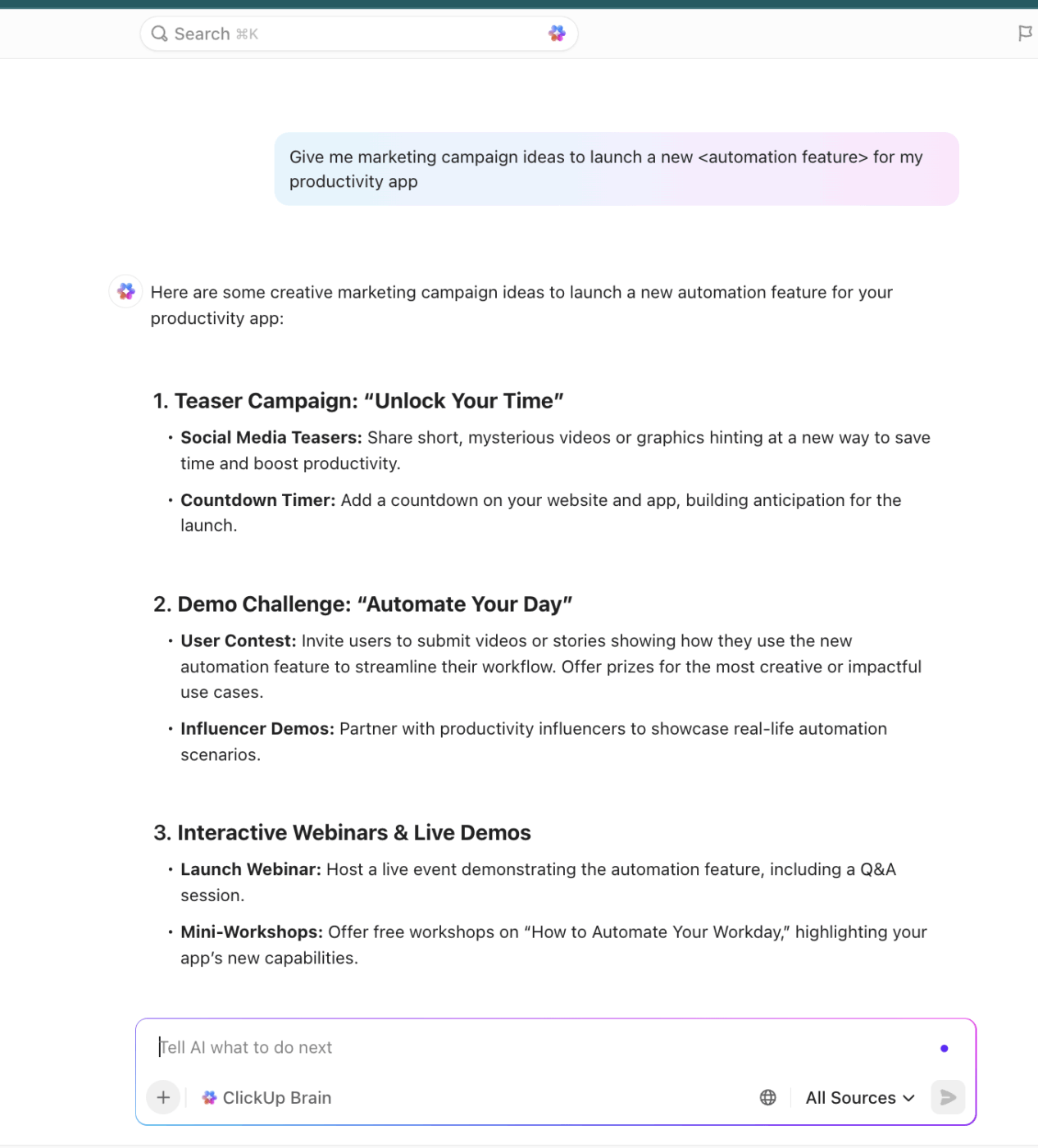
Brain helps you generate campaign ideas, plan marketing strategies, write blog briefs, draft progress reports, summarize research, and more.
ClickUp’s Marketing Platform also offers pre-built templates for every use case. For example, ClickUp’s Social Media Posts Template helps you plan and organize social media content so you know what’s going live and when.
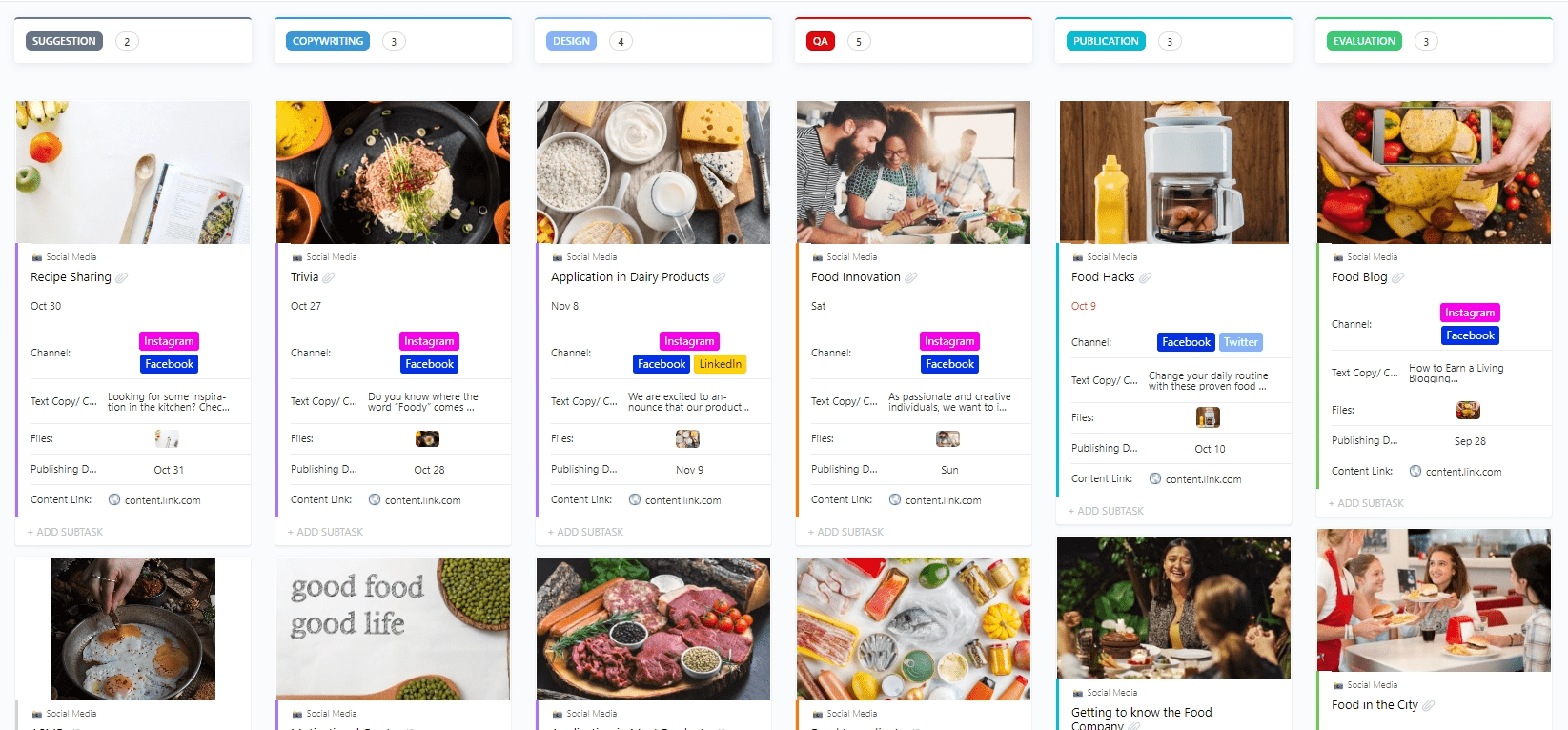
With this template, you can:
- Create tasks with custom statuses such as Cancelled, Complete, For Approval, For Revision, and In Progress to track progress at each stage
- Use custom fields to categorize and add attributes to manage social media content
- Organize information using 6 custom views, including Content Library, Content Stage, and more
ClickUp best features
- Proofing: Streamline creative reviews with ClickUp Proofing —leave comments directly on images, videos, or PDFs so designers and marketers can act quickly on feedback
- Clips: Record and share quick updates or walkthroughs with ClickUp Clips and give campaign context without hopping on a call
- Notetaker: Capture meeting notes and action items with ClickUp’s AI Notetaker, then turn them into tasks or share them instantly with your team
- Workload management: Balance resources smartly using ClickUp Workload View to see who’s overbooked or underutilized across campaigns
- Efficient execution: Keep your campaign execution structured with ClickUp’s Project Time Tracking, so you can log hours against billable or non-billable marketing work.
- Contextual chat: Keep everyone aligned with ClickUp Chat —conversations happen right where the work lives, eliminating scattered feedback
- Custom statuses: Add custom stages like “In Progress” or “Under Review” to tasks with Custom Statuses in ClickUp and keep every marketing deliverable moving through a clear workflow
- Assigned comments: Assign action items directly from feedback with ClickUp’s Assigned Comments to instantly convert suggestions into trackable tasks
- Flexible views: Schedule, execute, and monitor campaigns using a range of views such as Calendar, List, Kanban, Timeline, and more
ClickUp limitations
- It can be overwhelming for new users; it takes time and effort to master the tool and set it up