
Statement of Work Templates
Choose a Format
Pick the tool you already work in. Each one opens a ready-to-use version of this template.

Most used
ClickUp
Best for Teams scoping and tracking work inside ClickUp
The Professional Services SOW framework built in ClickUp Docs with nested pages for each section, task linking for deliverables tracking, and approval workflows for milestone sign off gates.
Open ClickUp version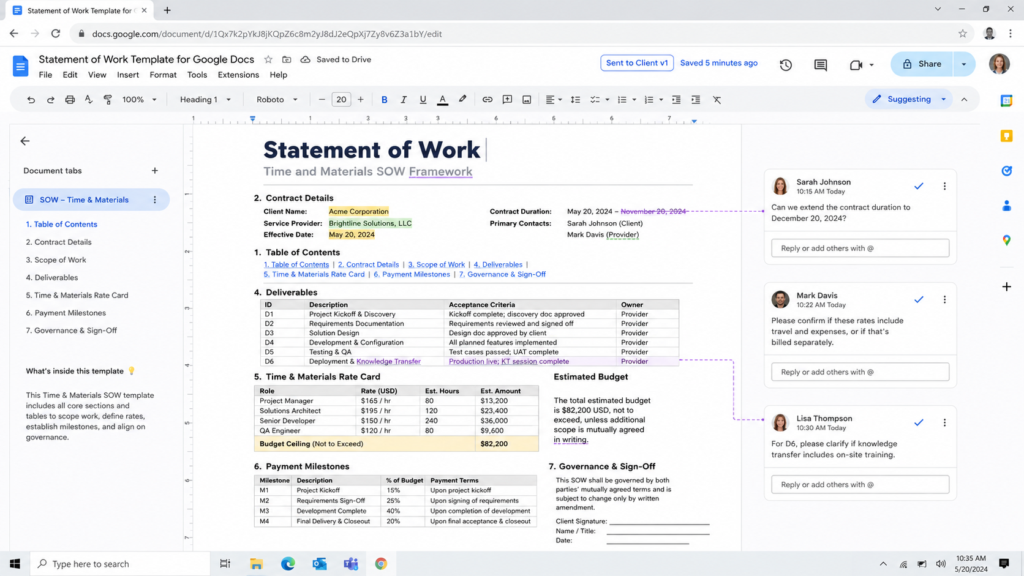
Google Docs
Best for Sharing an editable SOW in Google Workspace
The Time and Materials SOW framework built in Google Docs with real time collaboration, Suggesting mode for contract redlining, named version history, and shareable links for client review without file attachments.
Open Google Docs version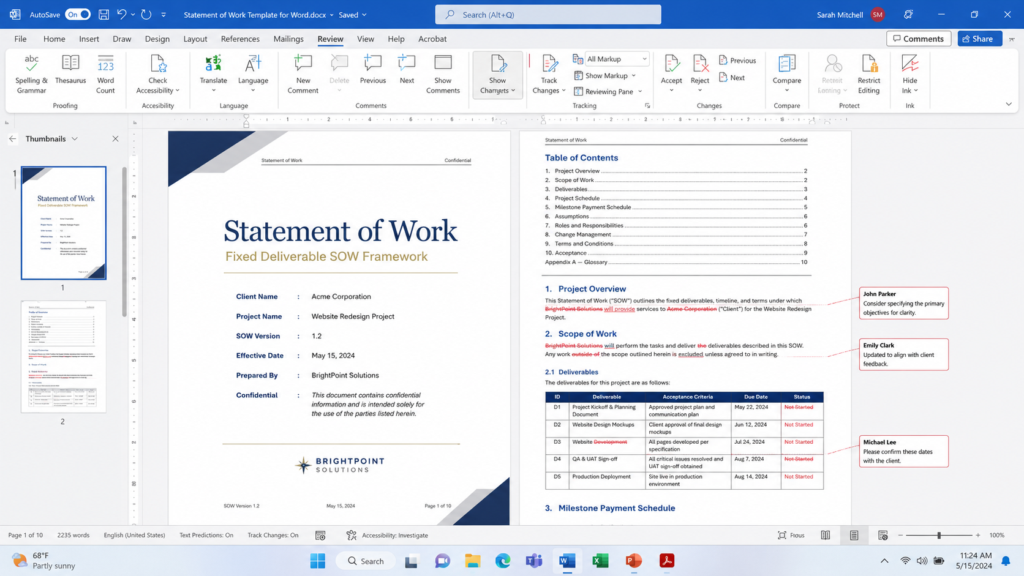
Word
Best for Drafting a formal SOW in a Word document
The Fixed Deliverable SOW framework built in Microsoft Word with styled headings, an autogenerated Table of Contents, deliverables tables, milestone payment schedule, and Track Changes for contract negotiations.
Open Word versionHow to Choose the Right SOW Framework
The framework you pick depends on one question: how well defined is the scope before work begins?
Fixed Deliverable SOW
Use this when you can list every deliverable, assign a price to each, and define what "done" looks like before signing. IT implementations, construction projects, and any contract where the client expects a firm price. The WBS section forces you to decompose work into measurable outputs, and sign off gates create contractual checkpoints that protect both sides.
Professional Services SOW
Use this when the scope is defined at the service level but specific tasks emerge as work progresses. Consulting engagements, agency retainers, and advisory work fit this pattern. The client knows they need a brand strategy or a system migration, but exact deliverables get refined through discovery. The change control section is critical because scope shifts are expected, not exceptional.
Time and Materials SOW
Use this for ongoing technical staff or support billed by the hour. The rate card replaces the fixed price. The weekly status report replaces milestone sign offs. The not to exceed ceiling gives the client budget certainty without forcing you to predict exactly how many hours each task will take. Staff augmentation, managed services, and long term technical support all use this model.
When a Single SOW Is Not Enough
Large engagements often combine two frameworks. One Fixed Deliverable SOW covers the implementation (defined scope, fixed price, milestone payments), and a separate Time and Materials SOW covers ongoing support after launch (hourly billing, monthly cap, quarterly renewal). Keeping them as separate documents prevents scope confusion and makes billing disputes easier to resolve.
Another common combination pairs a Professional Services SOW for the strategy phase with a Fixed Deliverable SOW for execution. The first SOW produces the requirements that define the second SOW's scope. This works well for digital transformation, ERP implementations, and any project where you cannot define the build until you complete the design.
Before You Start Writing
Signature authority. Clarify who can sign on both sides. A SOW approved by the project manager but rejected by procurement wastes weeks.
MSA status. Determine whether a master services agreement governs this engagement. If one exists, the SOW only needs scope, timeline, and price. If not, the SOW must include legal terms (confidentiality, liability, termination, IP).
Payment trigger. "Net 30 from invoice" is different from "payment upon milestone acceptance," and the difference determines your cash flow for the entire engagement. Agree on this before drafting.
For a deeper look at SOW structure, required sections, and common mistakes, start with the Statement of Work overview.
Frequently Asked Questions
A statement of work covers the entire agreement, from scope and timeline to pricing and governance. A scope of work is one section within that document describing what work gets performed. In formal procurement they are not interchangeable. The SOW is the binding document.
Only when no master services agreement already exists. When an MSA is in place, the SOW references it and covers only scope, timeline, deliverables, and pricing. Without an MSA, the SOW needs to add confidentiality, liability caps, termination conditions, and IP assignment.
A straightforward consulting engagement needs 3 to 5 pages. Complex IT or construction projects typically run 10 to 20 pages including the WBS and milestone schedule. Length should match complexity. Too short leaves gaps that cause disputes, and too long usually signals the scope is not well understood.