
Task Management Tools
The task management software market passed $5 billion in 2025, growing at over 15% annually as remote and hybrid work made digital task tracking a baseline requirement for teams of every size (The Business Research Company, 2026). That growth means more choices than ever, and more noise to sort through.
What you will not find here: a list that ranks the most expensive tools first or hides limitations behind vague language. Each entry includes an honest verdict, specific strengths and weaknesses, and recent product updates so you can evaluate what each tool can do right now.
We evaluated 25 task management tools across six weighted criteria and narrowed the field to the 10 that consistently outperformed the rest. Every tool on this list was tested with real projects over a minimum of two weeks, and every one has a functional free plan or free trial. Pricing, features, and free plan limits were verified in April 2026.
Task Management Tools, Ranked
ClickUp
Free forever plan with unlimited tasks and members. Unlimited plan starts at $7 per member per month billed annually.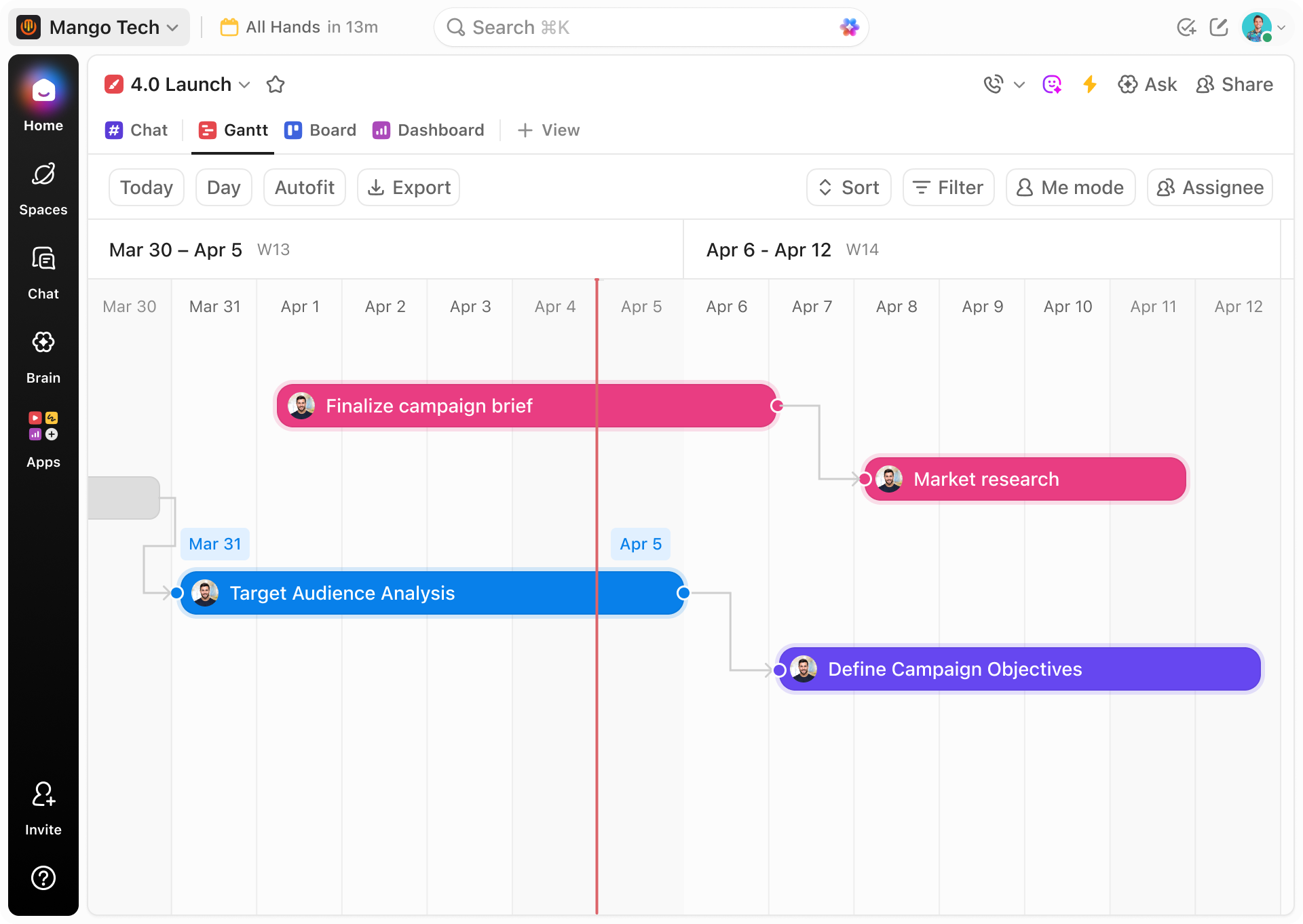
ClickUp does everything, and that is both the strongest argument for it and the biggest thing you need to know going in. Tasks, docs, goals, time tracking, whiteboards, and AI live in one workspace. You will not need Notion for docs, Toggl for time tracking, or a separate goal tracker. The free plan includes all of it with no user limits, which is unmatched on this list.
The reason it scored highest across our criteria is the hierarchy. Every task sits inside a structure of Spaces, Folders, and Lists that mirrors how your organization actually works. Set up a Marketing space with a Content folder and a Blog list, then switch between Kanban, Gantt, Table, and Calendar views without duplicating anything. Once your data lives in that structure, every view pulls from the same source.
Brain, the built in AI, is genuinely useful for the boring parts of task management. Describe a project in a sentence and it generates the subtask breakdown. It summarizes 30 message comment threads into three lines. It drafts the Monday morning status update you would have spent 10 minutes writing. Because it connects to your goals, docs, and tasks across the whole workspace, its suggestions have context that standalone AI tools lack.
The honest trade off: your team will spend 2 to 4 weeks feeling lost. The interface packs in so many features that new users do not know where to start, and the mobile app prioritizes feature access over the quick capture speed you get from Todoist. Assign one person to own the workspace setup before inviting the full team. Paid plans start at $7 per member per month and add automations, time tracking, and dashboards.
- Unlimited tasks, members, and every view included on the free plan
- Brain AI generates subtask breakdowns, summarizes threads, and drafts status updates with workspace context
- One platform replaces separate tools for docs, goals, time tracking, and whiteboards
- 15+ views (Kanban, Gantt, Table, Calendar, Timeline, Mind Map) all pull from the same data
- Custom Fields and task types let you adapt any workflow without workarounds
- New users report 2 to 4 weeks before the interface feels intuitive due to feature density
- Mobile app prioritizes feature access over quick task capture speed
- Notification volume can overwhelm without careful per space and per list configuration
Todoist
Free plan for up to 5 active projects. Pro plan at $5 per month. Business plan at $8 per user per month.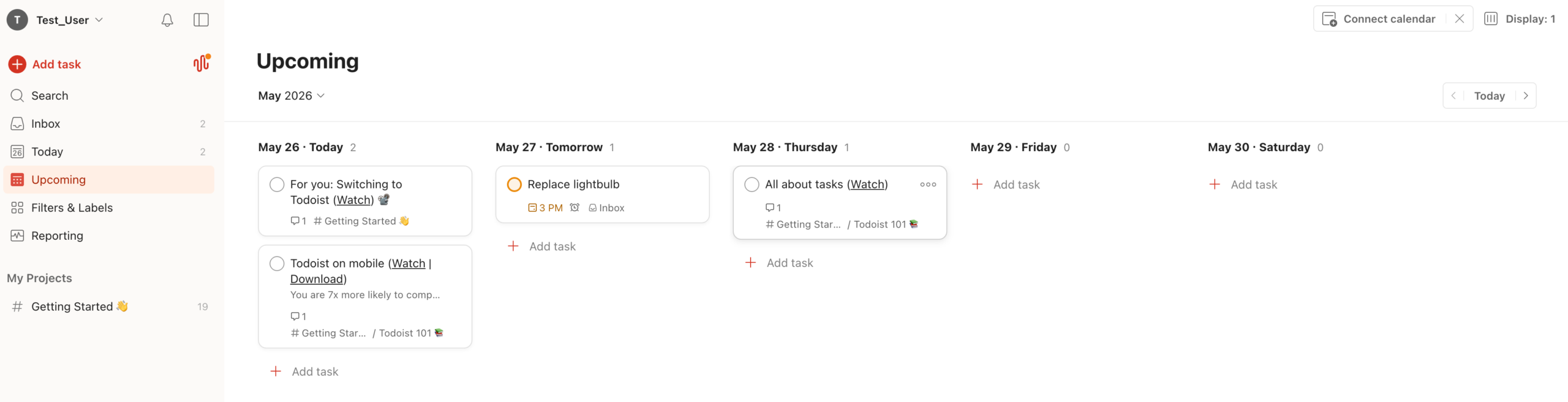
Type “Call the dentist tomorrow at 3pm” and Todoist parses the task name, due date, and time in one step. That speed of capture is the entire reason it exists, and nothing else on this list matches it. The app syncs across every platform instantly, offline mode actually works, and the interface stays minimal enough that you never feel like you are fighting the tool to use it.
Organization is simple on purpose: projects, sections, labels, and four priority levels. Filters let you build custom views like “all P1 tasks due this week,” and the Upcoming view shows your full schedule on one timeline. The AI Assistant added in 2026 breaks big tasks into subtasks and suggests what to work on next, which is helpful when your list gets long enough to feel paralyzing.
Todoist is not a team management platform and does not pretend to be. There are no Gantt charts, no workload views, no time tracking, no dashboards. Collaboration works for small groups sharing a project, but the moment you need to see what 10 people are working on this week, you have outgrown it. Free plan gives you 5 active projects. Pro ($5 per month) unlocks reminders and filters. Business ($8 per user per month) adds team workspaces.
- Fastest natural language task input of any tool tested, parsing dates, times, and recurrence in one entry
- Cross platform sync across every device with reliable offline mode
- Karma system gamifies task completion and builds streaks that keep you consistent
- No Gantt charts, workload views, time tracking, or team dashboards
- Free plan limited to 5 active projects and 5 collaborators per project
Asana
Free Personal plan for up to 2 users. Starter plan at $10.99 per user per month billed annually. Advanced plan at $24.99 per user per month billed annually.You assign a task to Sarah, she finishes it, and the next task in the chain automatically lands on Mike’s plate with a Slack notification. That handoff used to take three follow up messages. Asana makes it invisible, and that is the core of why structured teams choose it over simpler tools.
My Tasks is the feature most users mention first. It automatically sorts everything assigned to you into Recently Assigned, Today, and Upcoming without any configuration. You open Asana in the morning and your priorities are already organized. Rules, the automation engine, got significantly more powerful in 2026 with conditional logic and multi step triggers. A common setup: when a task moves to “Ready for Review,” assign it to the team lead and post to Slack. Approval workflows moved from the expensive Advanced plan down to Starter in March 2026, which was a big deal for smaller teams.
Asana handles the transition from “we need a task list” to “we need to manage multiple projects” better than most tools. Portfolios aggregate progress across projects into a single dashboard, views switch between List, Board, Timeline, and Calendar in one click, and the interface stays clean enough that most people are productive within a day.
The pricing shift you need to know: the free plan dropped from 10 users to 2. Most teams now start at Starter ($10.99 per user per month). If you need goals, portfolios, or native time tracking, that jumps to Advanced at $24.99 per user per month. For teams that need those features, the gap between tiers is steep.
- My Tasks automatically organizes your daily priorities with zero setup
- Rules automation handles task routing, notifications, and approvals without code
- Switching between List, Board, Timeline, and Calendar takes one click with no data duplication
- Portfolios give managers a single dashboard across all active projects
- Free plan cut from 10 users to 2, pushing most teams to the $10.99 per user Starter plan
- Goals, portfolios, and time tracking locked behind Advanced at $24.99 per user per month
- Custom Fields on Starter are limited compared to Advanced and Enterprise tiers
Monday.com
Free for up to 2 users. Basic plan at $9 per seat per month (3 seat minimum). Standard plan at $12 per seat per month billed annually.If your team thinks in spreadsheets, Monday will feel familiar on day one. Every task is a row, every detail is a column (status, person, date, priority, or whatever you invent), and you build task trackers, content calendars, and CRMs from the same building blocks. The people who love it are the people who used to manage everything in Google Sheets and wished it could send notifications.
The 200+ automation templates are where Monday earns its ranking. When a status changes to Done, notify the manager and archive the row. When a due date passes, move the task to an Overdue group and assign a follow up. You set these up by clicking through a visual builder, not writing code. Cross board automations launched in March 2026, which means your marketing pipeline can now trigger tasks in your design board automatically.
Watch the pricing before you commit. A 3 seat minimum on every paid plan means a two person team pays for a ghost seat. The Basic plan at $9 per seat sounds reasonable until you realize it ships without automations or integrations, making Standard at $12 per seat the actual starting point. The free plan supports 2 users on up to 3 boards.
- Spreadsheet style model is immediately familiar to teams that managed work in Google Sheets or Excel
- 200+ automation templates handle common workflows without configuration or code
- Cross board dashboards aggregate data from multiple projects into one reporting view
- Color coded, visual interface makes task status scannable at a glance
- 3 seat minimum on paid plans means small teams pay for unused seats
- Basic plan at $9 per seat lacks automations and integrations, so Standard at $12 is the real entry point
- Boards are separate by default; connecting work across them requires deliberate cross board setup
Trello
Free plan with unlimited cards and 10 boards. Standard plan at $6 per user per month. Premium at $12.50 per user per month.Content pipeline with Draft, In Review, Approved, and Published columns. Hiring funnel with Applied, Phone Screen, Interview, and Offer. Bug tracker with Reported, Confirmed, In Progress, and Resolved. If your workflow moves through clear stages, Trello makes it visible in under five minutes. Cards are tasks, lists are stages, drag a card from one column to the next and everyone sees the update.
Butler, the automation engine, is surprisingly capable for a tool this lightweight. Set up a rule that archives cards when they hit Done, a button that assigns, labels, and sets a due date in one click, or a scheduled command that reshuffles your “This Week” list every Monday morning. Power Ups extend functionality with calendar views, voting, and third party integrations.
The simplicity is also the ceiling. Each board is its own island with no way to see across boards natively. There are no subtasks beyond checklists, no dependencies, and no workload views. Teams that start on Trello and grow past 15 people or 5 concurrent projects almost always migrate to something with more structure within a year. Free plan includes unlimited cards and 10 boards. Standard ($6 per user per month) removes the Power Up limit. Premium ($12.50) adds views and reporting.
- Working Kanban board in under two minutes with zero configuration or training
- Butler automation handles rules, one click buttons, and scheduled commands without code
- Free plan includes unlimited cards, 10 boards, and one Power Up per board
- Each board is an isolated silo with no native way to report across projects
- No subtasks beyond checklists, no dependencies, and no workload views
TickTick
Free plan with 9 lists. Premium at $35.99 per year (approximately $3 per month).Three dollars a month gets you a task manager, a calendar that merges your events and tasks into one daily view, a habit tracker with streaks, and a Pomodoro focus timer that logs sessions against specific tasks. If you are paying for three separate apps to do those things right now, TickTick replaces all of them.
The habit tracker is what makes it more than a Todoist alternative. Set habits by frequency (daily, three times a week, weekdays only), watch your streaks build, and review completion stats over time. The Pomodoro timer ties focus time to individual tasks, so you can see exactly where your hours went. Collaboration is not the point here. There are no shared dashboards, no workload views, and no team permissions. This is a personal productivity tool that does its job well and costs almost nothing. Free plan gives you 9 lists with 99 tasks each. Premium is $35.99 per year.
- Habit tracker with streaks and completion statistics replaces a separate habit app
- Pomodoro timer logs focus sessions against specific tasks so you see where your time goes
- No team collaboration beyond basic shared lists
- Natural language input works but is not as polished as Todoist's parsing
Notion
Free for individuals with unlimited pages. Plus plan at $10 per member per month. Business plan at $18 per member per month.You will spend your first week building the tool that ClickUp and Asana hand you at signup. Whether that sounds like a waste of time or the whole point depends on what kind of team you are.
Notion gives you building blocks: databases, properties, views, and relations. Create a Tasks database, add columns for status, priority, assignee, and deadline, then display it as a table for planning meetings, a Kanban board for daily standups, a calendar for deadline tracking, and a gallery for visual projects. Connect it to a Clients database and a Projects database through relations, and suddenly you have views that pull from multiple sources in ways no prebuilt tool can replicate.
The gap that closed in 2026 is automations. Notion added a native builder in January that triggers actions when database properties change. Status moves to Done, assignee gets notified, follow up task gets created. It is still less powerful than Asana Rules or Monday’s 200+ templates, but it handles the basics. Notion AI agents go further: they read your meeting notes and automatically create tasks from action items, then update statuses as linked documents change.
The honest limitations: databases slow down noticeably past 5,000 items despite performance work in February 2026. New teams will spend a week on setup before anyone can use the workspace productively. And if the person who built the system leaves, the next person inherits a custom tool with no documentation. Team plans start at $10 per member per month.
- Relations between databases create views that no prebuilt task tool can replicate
- Hundreds of community templates provide starting points for sprint boards, GTD systems, and content pipelines
- Native automations builder triggers actions on database property changes without third party tools
- AI agents automatically create tasks from meeting notes and update statuses from document changes
- Expect a full week of setup before the workspace is usable by the whole team
- Database performance degrades past roughly 5,000 items
- If the person who built the system leaves, the next person inherits a custom tool with no documentation
Microsoft To Do
Microsoft 365 usersIf you use Outlook for email, To Do is already connected. Flag a message and it appears as a task. Planner assignments sync automatically. There is nothing to install, nothing to configure, and nothing to pay for.
My Day resets every morning and asks you to choose what matters today, which prevents the endless scrolling through a master list that makes other tools feel overwhelming. Copilot, added in March 2026, reads your calendar and inbox and suggests which tasks to prioritize. Shared lists let small teams track basic assignments together.
That is the full feature set. No Kanban boards, no custom fields, no automations, no reporting, and minimal connectivity outside Microsoft’s ecosystem. To Do is the right choice if your task management needs are personal or lightly collaborative and you already live in Microsoft 365. If you need anything beyond personal lists and shared to dos, every other tool on this list does more.
- Completely free with no paid tier, no feature gates, and no user limits
- Flagged Outlook emails and Planner tasks sync automatically with zero setup
- No Kanban boards, custom fields, automations, or reporting of any kind
- Almost no connectivity outside the Microsoft 365 ecosystem
Jira
Free for up to 10 users. Standard plan at $8.15 per user per month. Premium at $16 per user per month.If your team runs sprints, Jira is the default for a reason. You create a backlog, groom it, pull items into a two week sprint, track velocity, and run a retrospective. The workflow is baked into the tool rather than something you configure on top of it, and that structure is why engineering organizations with hundreds of developers standardize on Jira instead of trying to make a general purpose tool fit.
The power user feature that keeps advanced teams loyal is JQL, the query language. Type “assignee = currentUser() AND sprint in openSprints() AND priority = High” and you get exactly the filtered view you need, faster than clicking through any visual builder. Bitbucket and GitHub integrations connect commits and pull requests directly to sprint issues, so you can trace a feature from the backlog item through the code to the deployment.
Atlassian made Jira more approachable in 2026. The navigation redesign cleaned up the sidebar, Atlassian Intelligence generates sprint summaries and retro insights, and Plans (formerly Advanced Roadmaps) moved to the Standard tier, opening cross project planning to teams that previously could not justify Premium pricing.
The limitation is specific: Jira assumes you know Agile. If your team does not run sprints, does not think in epics and story points, and does not want to learn JQL, you will abandon it within weeks. Marketing, HR, and operations teams that try to repurpose Jira for general task management almost always regret it. Free for up to 10 users. Standard starts at $8.15 per user per month.
- Sprint planning, backlog grooming, and velocity tracking are native, not bolted on
- JQL query language builds precise filtered views faster than any visual interface
- Bitbucket and GitHub integrations trace code commits back to the sprint issues they implement
- Plans (formerly Advanced Roadmaps) moved to Standard in 2026 for cross project planning
- Assumes Agile fluency; nontechnical teams almost always abandon it within weeks
- JQL is powerful but creates a learning barrier for teams used to visual filters
- Interface complexity has accumulated over years despite the 2026 navigation cleanup
Basecamp
Free plan for personal projects. $15 per user per month or $299 per month flat for unlimited users.Basecamp’s pitch is that your team’s biggest problem is not missing features. It is too many features in too many tools creating too many notifications. Every project gets the same six things: to do lists, message boards, a schedule, file storage, automatic check ins, and group chat. You cannot add features, remove them, or rearrange them. That is the point.
Automatic check ins replace daily standups by asking each team member a recurring question (“What did you work on today?”) and compiling answers in one place. Hill Charts show project progress as a curve from “figuring things out” to “making it happen,” which gives managers a gut feel for where things stand without requiring task level status updates from everyone.
The pricing argument is simple math. $299 per month flat, unlimited users. A 30 person team pays $10 per head. A 50 person team pays $6. At scale, nothing on this list comes close. Card Table, added in March 2026, brings a lightweight Kanban view for the first time, though it is intentionally simpler than Trello. A per user plan ($15 per month) and a free personal plan also launched in 2026.
Task management is deliberately basic. No priorities, no dependencies, no custom fields. If you need granular task control, Basecamp is the wrong tool. If you need your team to stop drowning in Slack threads and actually know what to work on today, it might be exactly right.
- $299 per month flat for unlimited users makes it the cheapest option at scale by a wide margin
- Automatic check ins replace daily standups with asynchronous recurring questions and compiled answers
- No priorities, dependencies, custom fields, or Kanban boards beyond the lightweight Card Table
- Six fixed tools per project cannot be customized, removed, or reordered
Buying Guides
Why Picking a Task Management Tool Is Harder Than It Should Be
Every tool on this page claims to handle tasks, collaboration, and workflow automation. Most of them are telling the truth. The problem is that a freelancer tracking client deadlines and a 50 person operations team coordinating across three time zones both type “task management software” into the same search bar, and they need completely different tools. Picking the wrong category wastes weeks of migration time and leaves your team worse off than a shared spreadsheet.
The market split into three lanes over the past two years. Personal task apps like Todoist, TickTick, and Microsoft To Do optimize for one thing: getting a thought into a tracked task as fast as possible. Work management platforms like ClickUp, Asana, and Monday.com try to be the single place where teams plan, execute, and report on everything. And then there are the specialists: Jira for engineering sprints, Trello for simple Kanban boards, Basecamp for teams that think most software has too many features, and Notion for teams that want to build their own system from scratch.
The biggest change in 2026 is that AI stopped being a checkbox feature. ClickUp Brain writes your status updates and generates subtasks. Todoist’s AI breaks big tasks into smaller ones. Microsoft To Do’s Copilot reads your calendar and tells you what to work on today. Notion’s AI agents create tasks from your meeting notes without you lifting a finger. A year ago these were demos. Now they work well enough to save 20 minutes a day if you use them consistently.
That said, AI alone is not a reason to pick a tool. The fundamentals still matter more: can you create a task in under 5 seconds? Can you see what your team is working on without asking? Can you hand off work without sending a follow up message? The tools that answer yes to those questions and add useful AI on top are the ones that made this list.
The other shift worth knowing: free plans got stingier. Asana cut its free tier from 10 users to 2. Monday.com’s free plan caps at 2 users with a 3 seat minimum the moment you pay. If your team has more than two people, budget for $7 to $12 per user per month on the platforms, or stay with a personal tool that still has a generous free plan.
How to Read This List
We tested 25 tools with real projects over four weeks and kept the 10 that earned their spots. Each entry explains who the tool is for, what it actually feels like to use, and where it falls short. The tools that need more explanation get longer entries. The ones with a simple value proposition get shorter ones. Pricing and features were verified in April 2026. Entries vary in depth because some tools need more explaining than others. A platform with complex trade offs gets a longer treatment. A tool with a simple value proposition gets a shorter one.
The ClickUp Learn Hub is maintained by ClickUp. Some tools reviewed may compete with ClickUp products. We strive for accuracy and fairness in all evaluations. Our methodology and scoring criteria are disclosed on each page.
What Makes a Great Task Management Tool
A task management tool earns its place on your team by doing one thing well: making it obvious what needs to happen next, who owns it, and when it is due. Everything else, the integrations, the AI features, the mobile apps, is secondary to that core job.
The tools on this list range from lightweight personal task apps to full work management platforms. Some handle everything from sprint planning to resource allocation. Others do nothing but capture tasks fast and keep your day organized. Neither approach is inherently better. The right choice depends on whether you are managing your own to do list or coordinating work across a team of 50.
How to Choose the Right Tool for Your Team
Start with the problem you are actually solving. If your team loses track of who owns what, you need clear task assignment and real time status visibility. If deadlines slip because priorities shift without warning, you need a tool with flexible prioritization views like Kanban boards, priority fields, or calendar integrations.
Solo users and freelancers should prioritize speed of task capture and cross device sync. Teams of 5 to 15 need collaboration features like comments, file attachments, and shared views. Larger organizations need automations, permissions, and reporting to keep work moving without bottlenecks.
Free plans work for individuals and small teams with straightforward needs. Once you need custom workflows, time tracking, or advanced integrations, expect to pay $5 to $15 per user per month for a plan that does the job without workarounds.
Common Questions About Task Management Tools
What is the best free task management tool?
ClickUp for teams. Its free plan includes unlimited tasks, unlimited members, and every view. For personal use, Todoist is the fastest for capture. Microsoft To Do is completely free if you already use Microsoft 365.
Can I use task management tools for personal to do lists?
Yes. Todoist, TickTick, and Microsoft To Do are designed for personal use with strong free plans. ClickUp and Notion can handle personal tasks too, but they offer more depth and configuration than most individuals need or want to set up.
What is the difference between task management and project management software?
Task management tracks individual work items: what needs to happen, who owns it, when it is due. Project management adds timelines, resource allocation, budgets, and reporting across multiple workstreams. ClickUp, Asana, and Monday.com cover both. Todoist and Microsoft To Do handle tasks only.
How much does task management software cost per user?
Most paid plans run $7 to $12 per user per month. TickTick Premium is the cheapest at roughly $3 per month. Basecamp’s flat $299 per month for unlimited users makes it the cheapest per person at scale. Free plans have gotten more restrictive, with Asana cutting its free tier from 10 users to 2 in 2025.
Do task management tools integrate with Slack, Google Workspace, and Microsoft 365?
Most tools on this list connect to all three. ClickUp, Asana, and Monday.com each offer 200+ native integrations. Microsoft To Do integrates deeply within Microsoft 365 but has limited connectivity outside it.