30+ Best Kanban Board Examples to Streamline Your Workflow

Sorry, there were no results found for “”
Imagine you’re a project manager juggling multiple tasks and deadlines.
Your team is working non-stop, yet progress feels sluggish. You’re not sure what’s holding things up. In such scenarios, a Kanban board could be just the tool you need to regain control and boost efficiency.
Digital Kanban boards provide a clear visual of task progress, making prioritizing and addressing bottlenecks easier. They are particularly useful for Agile teams and productivity enthusiasts eager to refine their workflow management.
Exploring various Kanban board examples can inspire you to design or enhance your own board.
So, whether you’re constructing your first board or fine-tuning an existing one, the examples and templates in this blog will help you maximize the value of your Kanban board.
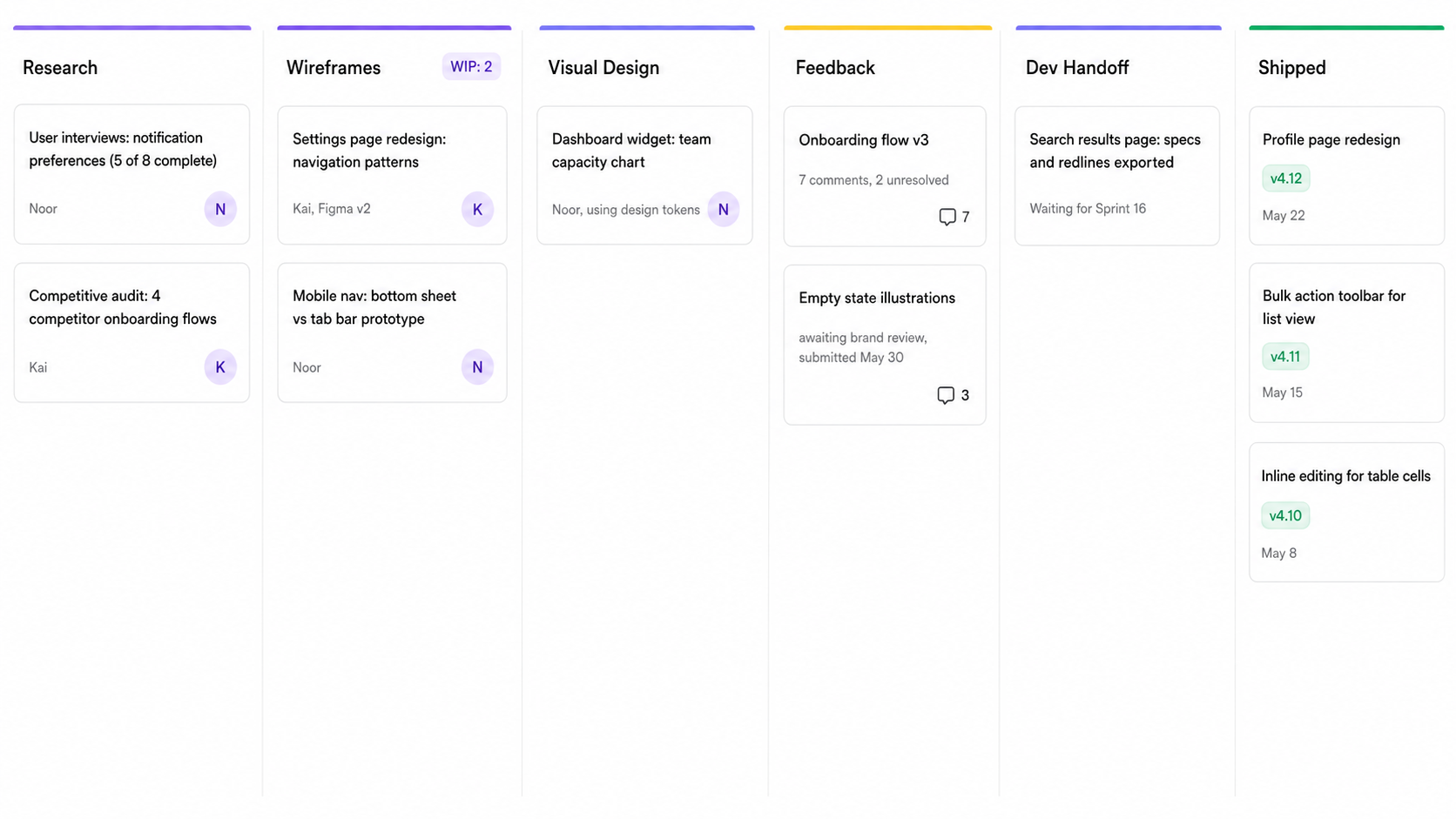
A Kanban board is a visual project management tool that helps you manage and optimize your workflow. It divides your work into columns that represent different stages of your process, typically starting with ‘To Do,’ moving through ‘In Progress,’ and ending with ‘Done.’
A Kanban board allows you to track the progress of individual tasks, identify glitches, and decide on the next steps to improve efficiency.
The Kanban method is ideal for business teams and individuals aiming to enhance productivity and maintain clarity throughout the project lifecycle.
While they started out as physical boards, today, teams prefer using online kanban boards for greater convenience.
Also Read: Gantt charts and Kanban boards compared
A Kanban board simplifies project tracking and enhances task management. Here are five compelling reasons to use it:
Read More: Free project management tools for teams
A Kanban board is designed to be simple yet effective in managing tasks and workflows. Here are the fundamental components of a basic Kanban board:
Incorporating advanced features into your Kanban board can significantly enhance efficiency and effectiveness. Here are some features to consider:
Also Read: Common project management challenges
If you are looking for a dynamic and intuitive tool for project management, consider the ClickUp Kanban Board. Its visual interface allows you to organize tasks across customizable columns and cards easily.
ClickUp also simplifies workflows and enhances productivity with features like WIP limits and real-time collaboration.
Now, let’s look at some of the prominent Kanban board examples, starting with ClickUp’s Kanban template.
The ClickUp Kanban Template transforms abstract plans into actionable tasks through an intuitive visual system suitable for various project types.
It is an essential tool for business teams aiming to improve project visibility and optimize management. This free Kanban board template helps in visualizing the task flows from inception to completion, facilitating better project planning and execution. Here’s what ClickUp’s Kanban Template helps you do:
Let’s take a look at the 31 most prominent industry-specific free kanban board templates to suit your organizational needs.
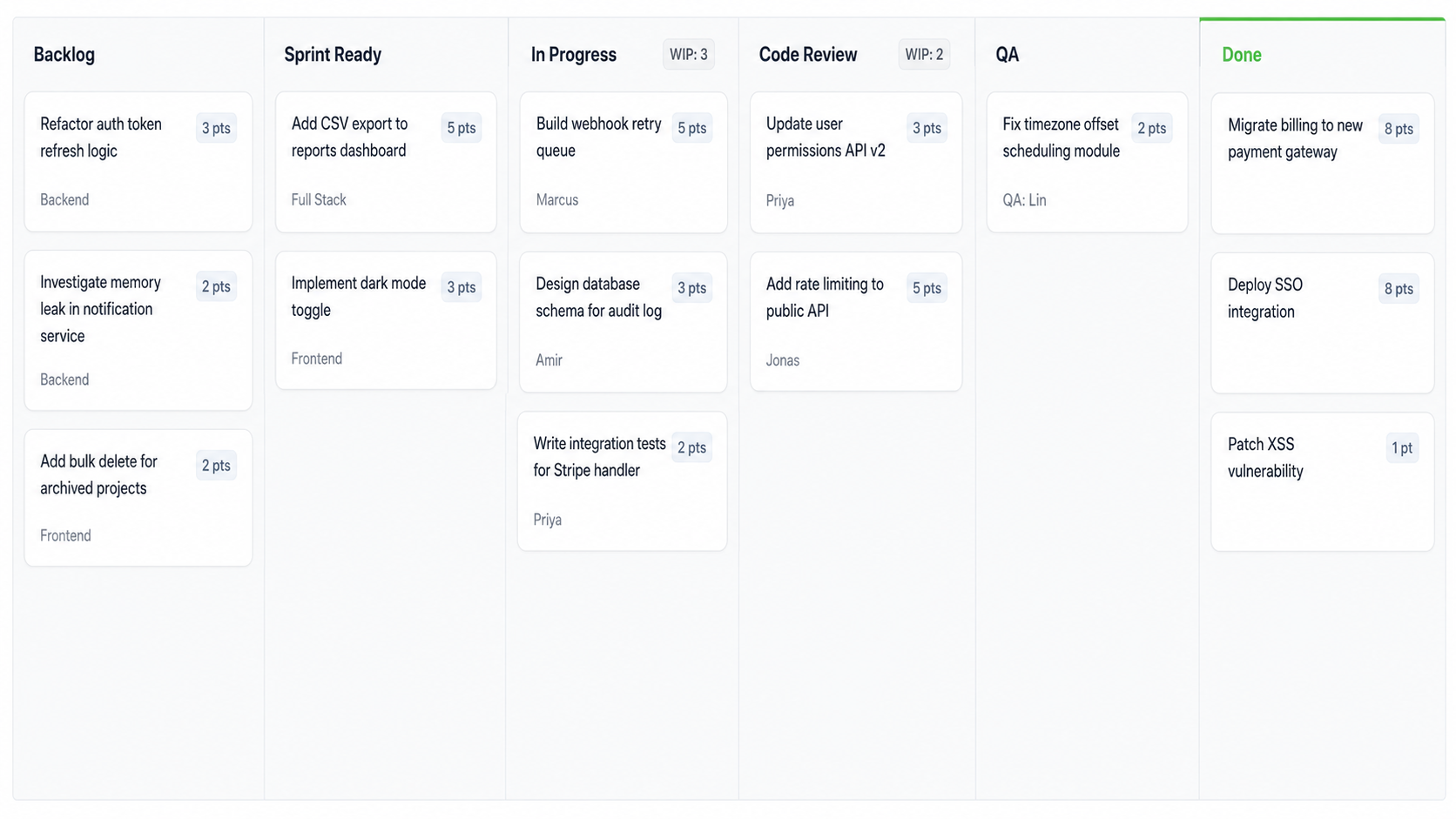
For software development teams and agile project planning, the Kanban methodology is crucial for maintaining smooth and efficient workflows. The Kanban approach helps teams visualize all the tasks, manage workloads effectively, and prioritize work based on shifting needs and timelines.
Let’s look at some prominent Kanban boards for software development:
The ClickUp Kanban Board for Software Development helps you visually track workflow stages, boost efficiency, and promote collaboration. It facilitates real-time updates and adapts to your project’s needs. This team Kanban board template helps your team:

The ClickUp Release Train Template streamlines and coordinates the process of delivering software updates, fostering efficiency, and implementing agile transformation. It helps align multiple teams with a unified and simplified release strategy.

The ClickUp Kanban View Roadmap Template is ideal for adapting to changes swiftly and maintaining an updated view of your product development roadmap. Software teams can use this Agile Kanban board to maintain clear visibility of development progress.

Designed to boost Agile project management, the ClickUp Simple Sprints Template helps teams plan better, execute tasks more efficiently, and deliver projects faster. This template empowers your team to plan and estimate tasks effectively with preset views and fields.

The ClickUp Agile Sprint Planning Template streamlines the management of complex projects through effective sprint planning. This sprint planning template helps bring clarity and focus, ensuring your team can optimize your project management resources effectively.
Kanban board templates are particularly effective in sales project management, helping teams refine the sales process from lead generation to closing deals.
These Kanban boards provide a visual overview of sales activities, allow sales teams to prioritize opportunities, track progress, and ensure proper follow-up of all deals.
Here are some specific Kanban templates from ClickUp catering to different aspects of your sales process:
The ClickUp Sales Plan Template equips sales teams with the tools to craft actionable and strategic sales plans. It aids you in setting strategic goals and provides a clear structure for tracking them.
Use the Timeline View to plan out when each task needs to be completed, the Gantt Chart View to track potential delays, and the Project Summary View to view progress and any changes that have been made.
It allows teams to:

ClickUp’s Sales KPI Template is crucial for sales teams that aim to measure and enhance their sales performance through clear, actionable insights. It enables the monitoring of key sales metrics, helping teams drive sales growth and operational efficiency.

The ClickUp Sales Calls Template provides a straightforward framework for managing and optimizing sales calls. This template helps sales teams organize their call schedules, track outcomes, and follow up efficiently, ensuring no opportunity is missed.

The ClickUp Customer Onboarding Template is designed to ensure a smooth transition for new customers. This template helps structure the onboarding process to provide consistent and high-quality customer experiences.
Also Read: Project management for sales teams
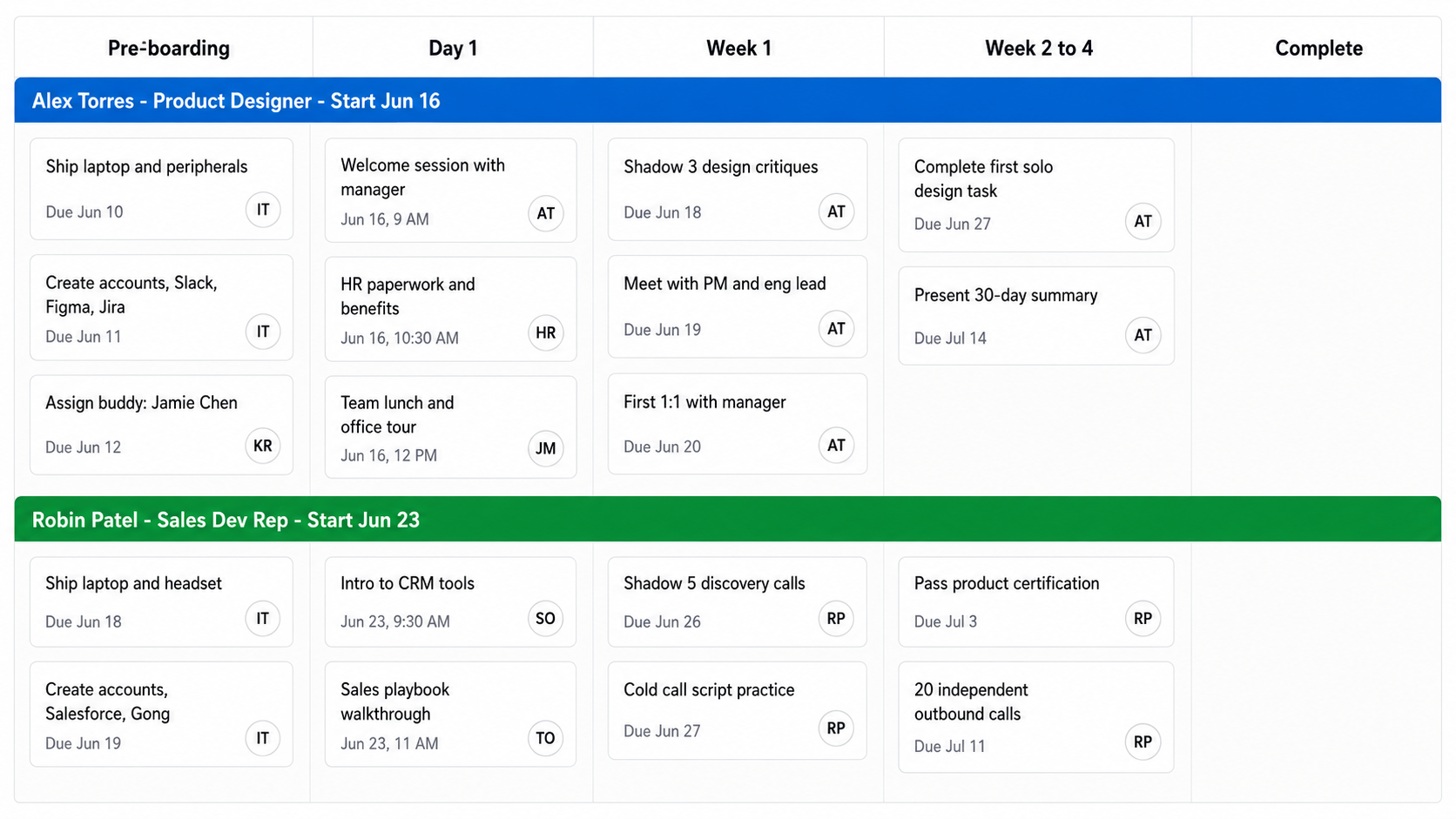
Kanban boards offer a visual method for HR teams to manage and streamline their various tasks, from recruitment processes to employee onboarding and operational planning.
By visualizing the workflow, HR professionals can easily track the progress of tasks, detect the underlying concerns, and redistribute resources as necessary to ensure the efficiency and timely completion of HR activities. Here are the four most prominent free Kanban templates by ClickUp for HR teams:
The ClickUp Team Schedule Template is a powerful tool for HR managers to optimize team workflows and ensure balanced work distribution. It facilitates a transparent view of individual and team schedules, helping to align tasks and responsibilities seamlessly across the organization.
Use the Weekly Schedule View to plan out tasks and assign them to the appropriate team member. The Project Activities View will help you keep track of each project’s progress, while the Workload View will allow you to analyze each team member’s workload easily.
Use this template to:

ClickUp’s Operational Plan Template is designed to streamline HR operations by providing a clear framework for daily activities and long-term goals. From workforce planning to performance monitoring, this template supports HR professionals in establishing a structured approach to their operations.

The ClickUp 30-60-90 Day Plan Template ensures new hires have a structured path to assimilation and success within the company. This template is an essential tool for onboarding new employees, helping HR managers set clear milestones and performance metrics.

The ClickUp Hiring Selection Matrix Template provides a systematic approach to evaluating candidates. It allows for an objective comparison based on predefined criteria, ensuring the selection of the most suitable candidates.
Kanban boards are vital project management tools for promoting visibility and enhancing workflow processes. They allow teams to visualize task progression and enhance clarity on project status and priorities.
By displaying tasks in a clear, organized manner, Kanban boards facilitate efficient resource allocation and timely adjustments.
Let’s look at ClickUp’s four most prominent Kanban templates that can help you improve project efficiency:
The ClickUp Risk Register Template is ideal for project managers focusing on risk assessment and mitigation. It facilitates proactive risk management by enabling teams to identify, analyze, and address potential risks before they impact project outcomes.
Different views, such as the Risks by Status View or the Costs of Risks View, will help you organize all risk-related information in an easy-to-analyze way.
This template allows you to:

ClickUp’s Project Retrospective Template is designed for project teams to reflect on completed tasks and identify successes and areas for improvement. This structured approach ensures continual learning and transparency.

The ClickUp Project Management Schedule Template helps project managers plan, execute, and track projects efficiently from start to finish. This template is essential for maintaining strict timelines and ensuring that project milestones are met.

ClickUp’s Decision and Change Log Template is crucial for documenting and tracking all decisions and changes during a project’s lifecycle. This ensures that all project adjustments are recorded and accessible for review and compliance and allows for better decision-making.
Kanban boards ease up the auditing process by visually organizing tasks, highlighting pending actions, and ensuring a clear flow of audit activities.
This systematic visualization helps auditors track progress, prioritize tasks, and manage timelines more effectively, reducing the risk of oversight and enhancing the overall efficiency of the audit cycle.
ClickUp’s Audit Program Template simplifies the complex task of auditing, offering a well-structured and systematic approach for tracking and analyzing business processes.
This template enables you to:
The Kanban system is particularly effective in financial management as it offer a clear visual representation of financial tasks and their current status. It aids in streamlining expense tracking, budgeting, and financial reporting.
Here are a few ClickUp Kanban tools for effective financial management:
ClickUp’s Business Expense and Report Template provides a comprehensive solution for managing and reporting business expenses. This ensures transparency and control over financial processes.
It helps you to:

The ClickUp Cost Analysis Template offers a well-structured framework for performing detailed cost assessments, which is crucial for strategic financial planning and management. It helps your teams to analyze cost structures, monitor and evaluate financial performance and facilitate strategic decision-making based on real-time economic data.
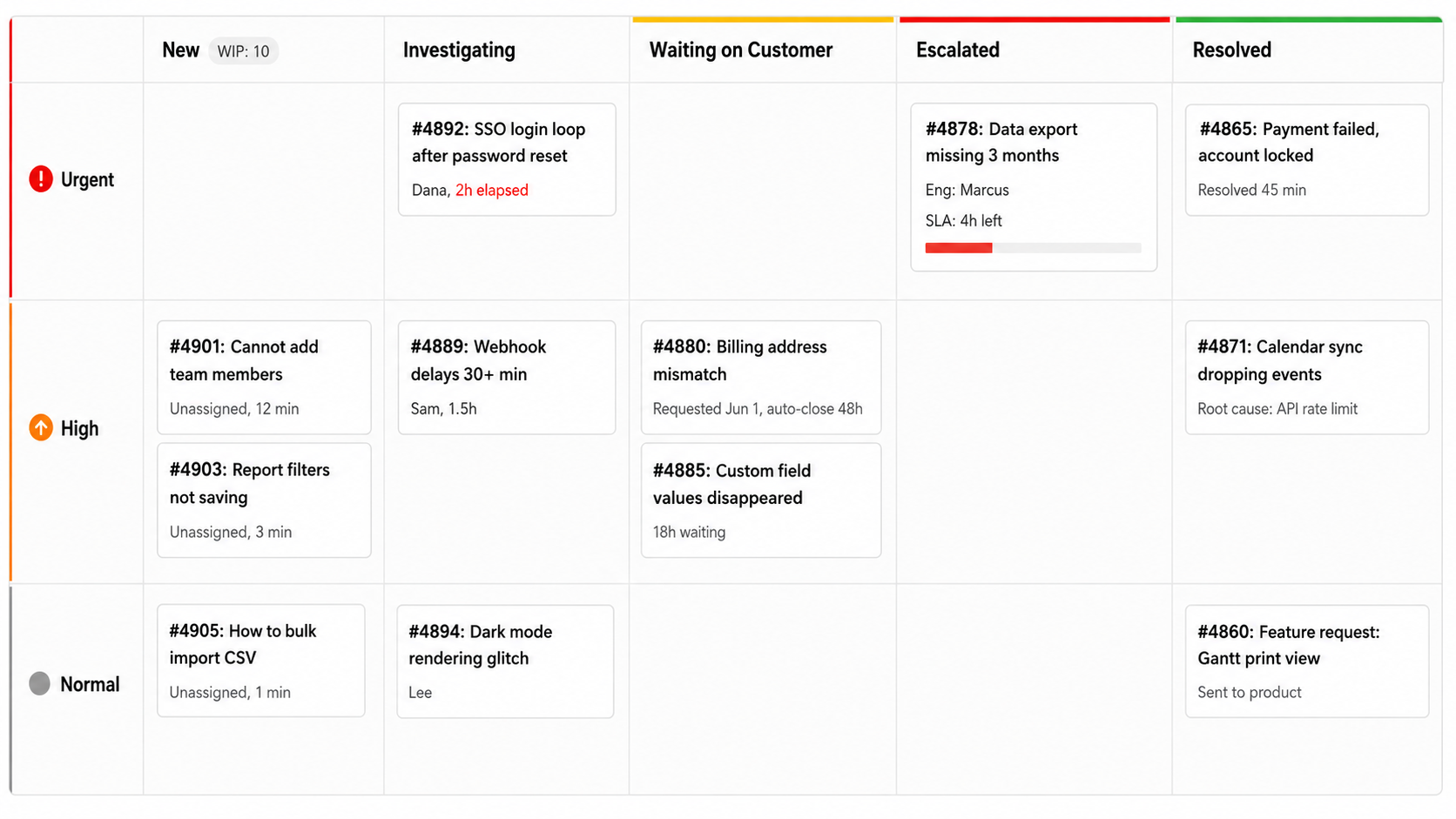
Kanban boards in IT management make the tracking of hardware, software, and tasks simple across various projects and operations. They allow IT teams to visualize work, monitor progress, and adapt resources dynamically, ensuring that projects move smoothly from initiation to completion.
By effectively managing queues and workflows, this portfolio Kanban board reduces cycle times and enhances responsiveness to new or changing IT needs. Below are four Kanban board examples from ClickUp:
ClickUp’s IT Inventory Template is designed to manage IT assets, ensuring everything from hardware to software licenses is tracked and updated. This template is perfect for IT administrators who need a robust system to manage their IT budgeting and maintain an accurate resource inventory.
Use this template to:

The ClickUp Contingency Plan Template offers a structured approach to risk management, allowing IT departments to prepare for and respond to various operational disruptions. This template helps develop and document response strategies for IT emergencies.

The ClickUp IT Security Template helps manage and prioritize IT security tasks to protect your digital resources. This template enables you to monitor threats, maintain compliance, and ensure data protection across your organization. It also helps you keep up with your IT policies and procedures so that all your team members are on the same page.

The ClickUp IT Support Template streamlines the handling of IT support requests, ensuring effective resolution and enhanced user satisfaction. This tool enables you to organize incoming support requests, assign tasks to appropriate team members, and track the resolution process to maintain high service standards.
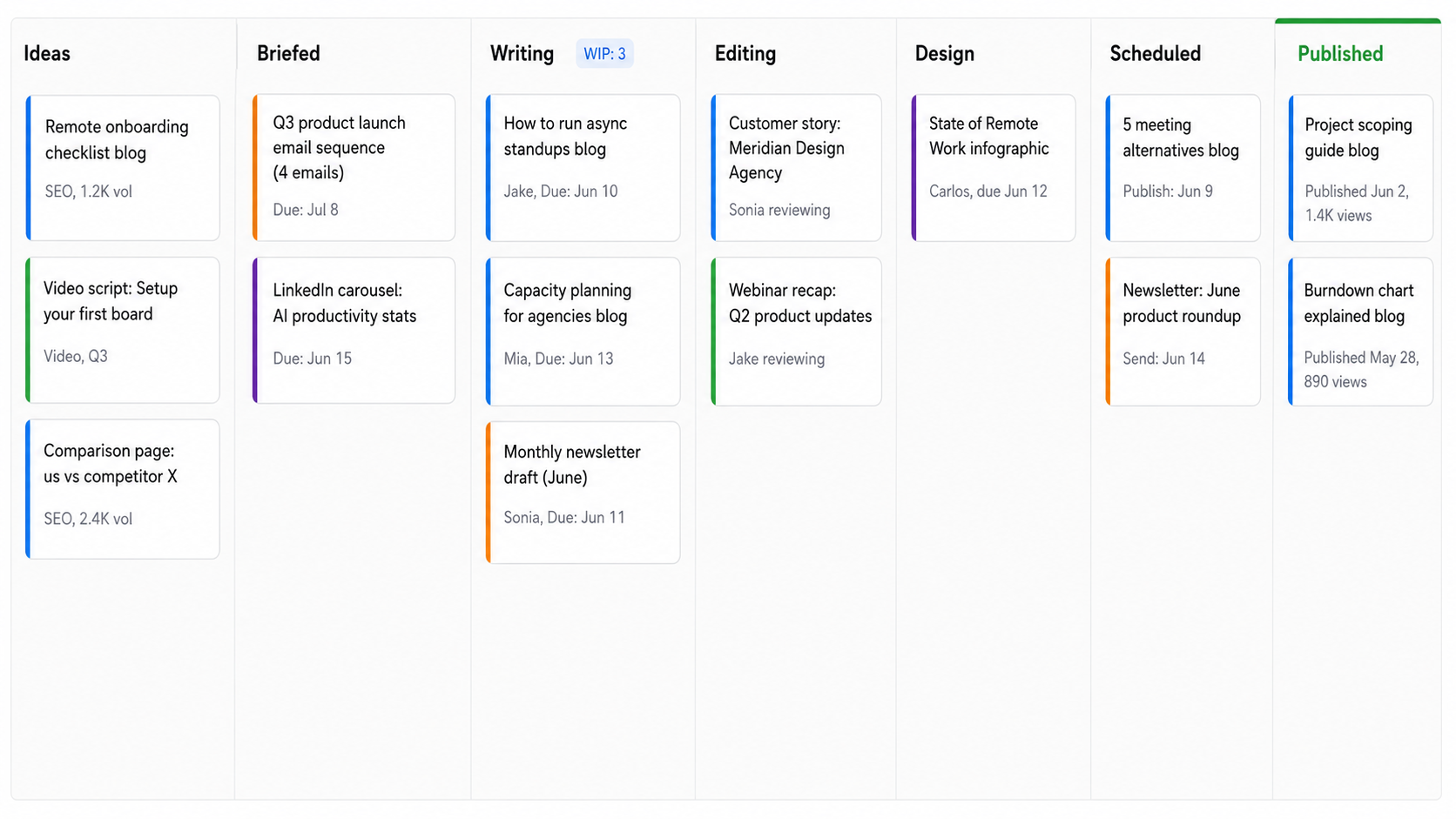
A marketing Kanban board helps enhance your team’s ability to prioritize tasks and track the progress of various projects. By allowing marketing project management teams to see the status of work at a glance, these boards facilitate collaboration so that everyone is aligned and aware of their respective deliverables.
Manage and schedule your content publication seamlessly with ClickUp’s Blog Editorial Calendar Template. It ensures your content strategy is organized and executed without a hitch. From ideation and planning to posting and analysis, this template covers everything you need to remember.
It even includes a Blog Calendar View to help you plan the publishing schedules for each blog article.
This tool helps you:

ClickUp’s Campaign Outline Template offers a well-designed approach to planning and executing marketing campaigns. It helps you map out every detail from inception to launch, ensuring nothing is overlooked.

ClickUp’s Non-Profit Event Planning Template offers a comprehensive solution for managing all facets of your non-profit event from one intuitive platform. This tool lets you oversee tasks—be it fundraising or participant registration, ensuring nothing is missed.

Develop and implement a balanced sales and marketing strategy with ClickUp’s Sales and Marketing Plan Template. It combines goal-setting, task management, and performance tracking to optimize both sales and marketing efforts.

Manage your social media content seamlessly with ClickUp’s Social Media Template. This tool allows you to schedule content, collaborate with your team, and measure engagement across all your channels.
Kanban boards are incredibly effective for daily planning as they provide a visual overview of your tasks for easy tracking and updating task statuses. This visual method helps prioritize daily activities and manage workload effectively, and productivity levels remain high.
The ClickUp Personal Productivity Template is ideal for individuals looking to simplify their daily tasks and enhance personal efficiency. Whether managing personal goals, freelancing projects, or household activities, this template helps keep everything organized.
Using this template, you can:

ClickUp’s Getting Things Done (Simple List) Template, inspired by David Allen’s renowned GTD methodology, is perfect for those who want an easy approach to managing daily tasks and projects. This template helps you capture, organize, and prioritize your tasks effectively, ensuring you miss nothing.
Here’s how to set up a digital Kanban board using ClickUp:
These Kanban board examples serve as invaluable blueprints for effectively managing and optimizing your workflow. By using Kanban cards to visualize the progression of tasks through various stages, they empower teams to pinpoint and address inefficiencies, thereby enhancing overall productivity.
Adopting a Kanban board can transform chaotic workflows into streamlined processes. If your team is looking to refine their project management strategies, an Agile project management tool like ClickUp can help.
Besides Kanban boards, ClickUp gives you a broad set of planning and analysis tools (and AI assistance) to make each stage of your project more efficient and easier to manage.
Ready to get started? Explore ClickUp’s Kanban board templates today!
© 2025 ClickUp